
Changed since our last check
Since we checked on .
- Emotion, pace and emphasis: Partly, now Yes.
- Instant cloning: No, now Partly.
- Consent of the voice’s owner: No, now Partly.
- Platforms: Partly, now Yes.
- What the free plan leaves on your audio: Yes, now Partly.
- Contract and cancelling: Yes, now Partly.
- Support: Yes, now Partly.
Murf AI price and terms
Terms
- Free to start
- PartlyPartlyNo end date, but the Studio trial ends once its 10 minutes of voice generation and transcription are exhausted
The terms in full
it has no downloads.
- Sign up without sales
- YesYes
What needs a higher plan
- Enterprise
- Cost for 10 hours a month (heavy use), Instant cloning, Professional cloning, Consent of the voice’s owner, Your voice trains their models, Team seats
For AI agents
- API
- Yes
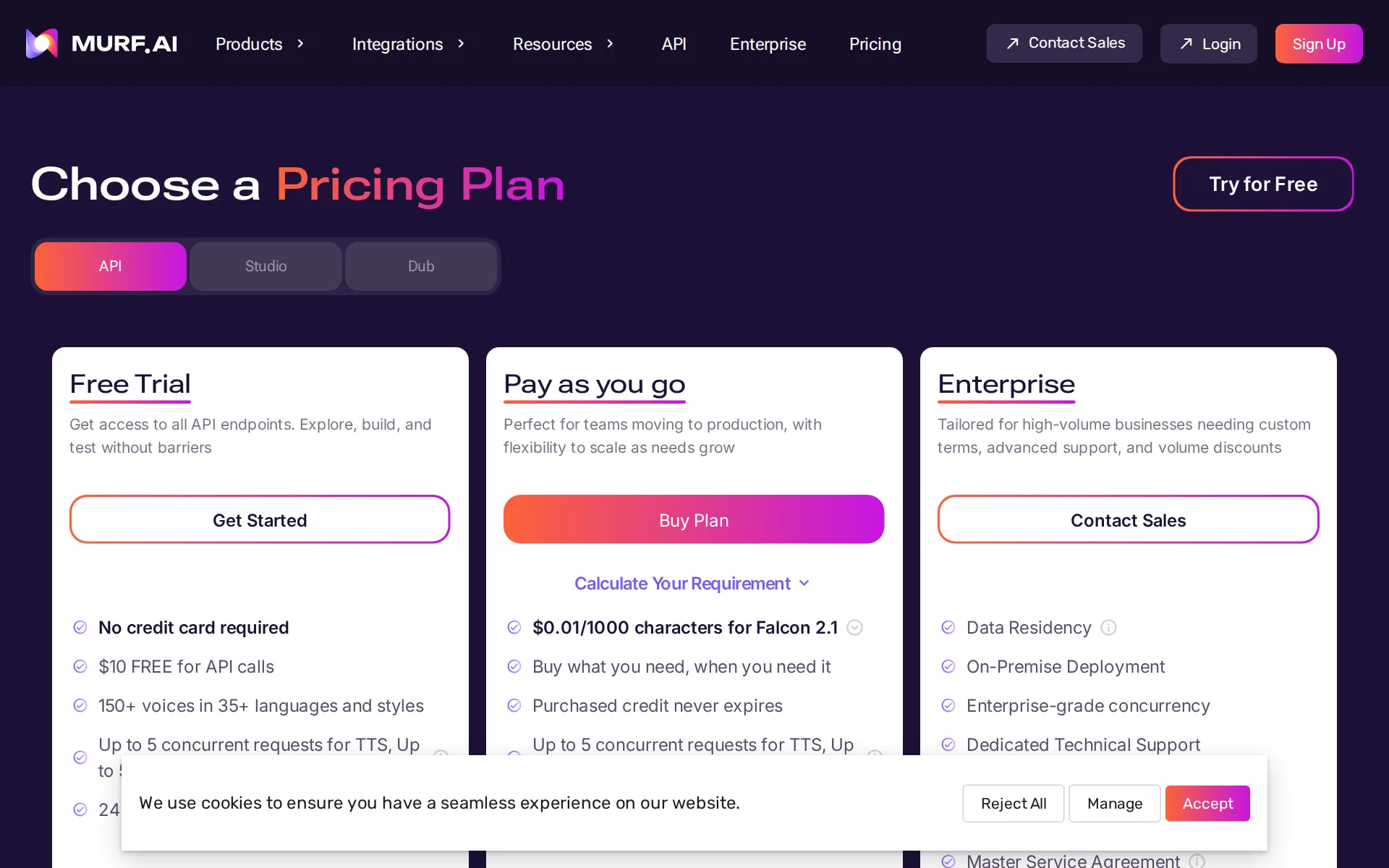
Pricing page, captured
murf.ai/pricing, checked
What we checked on Murf AI
Cost for 2 hours a month
$29 a month on Creator for 2 hours of 60 minutes (120 minutes of finished audio). Billing increment not stated: computed per second (60 min a hour). If they round each hour up to the minute (60 min), it is $29. an hour of finished speech is 60 minutes of audio; generation you do not download or keep is not counted where the vendor meters downloads
$29 / month
murf.ai/pricingChecked
Cost for 10 hours a month (heavy use)
Ten hours a month is not sold self-serve: Business tops out at eight hours for $99, so you must talk to sales.
On the page: Studio tab, Enterprise plan card beside the Business card showing 8 hrs/Month
murf.ai/pricingChecked
Cost to dub 60 minutes a month
Dubbing is metered at two credits per minute per language and credits cost twenty-five cents each, so one hour of video into one language works out at thirty dollars, which the page's own calculator confirms; the free dub plan keeps watermarks.
Your credit consumption will be determined by the duration of your files, at the rate of 2 credits per minute per language.
murf.ai/pricingChecked
Promotion and regular price
yearly shown monthly: the Studio plan cards open with the Billed Yearly switch already on, so the first figure shown for Creator is nineteen dollars a month billed as two hundred twenty-eight dollars annually, while the regular month-to-month price is twenty-nine dollars.
Billed Monthly Billed Yearly Saved 33% ... Creator Starter plan to create voiceovers for Individuals & Freelancers $19 / month $228 Billed Annually
murf.ai/pricingChecked
What the price counts
Studio measures allowance as voice generation time, charged by the duration of newly rendered speech.
Voice generation time (VGT) is calculated as the sum of the generated speech lengths for every sub-block.
Voices that use more
On the API the studio-quality text to speech model costs three times the newest Falcon 2.1 model per thousand characters, so the choice of model changes what speech costs; Studio subscriptions instead meter hours of voice generation with no per-voice rate stated on this page.
$0.01/1000 characters for Falcon 2.1 ... Text to Speech Studio-quality speech synthesis, ideal for multimedia applications requiring rich, expressive…
murf.ai/pricingChecked
Past your allowance
When Studio time runs out there is no published top-up rate: you upgrade the plan or ask support to repurchase it.
If your voice generation time runs out before the end of your billing cycle, don’t worry. You can always upgrade your plan or repurchase it to…
Unused credits
Unused Studio time can roll into only the immediately following renewal cycle and is lost after cancellation.
The carried-forward VGT from a billing cycle will only roll over to the immediately following month.
Commercial use
Creator includes commercial rights, while the free trial explicitly lacks commercial rights and downloadable files.
On the page: Studio tab, monthly billing position, Creator and Free cards
murf.ai/pricingChecked
Stock voices
Murf Studio documents more than 300 voice options, selectable by language, accent, style, and age.
Our selection includes various accents and age categories, providing over 300+ unique voice options for your needs.
Languages
Studio documents voices in 40+ languages with accents for English, French, Spanish, Portuguese, Chinese, and Dutch.
We currently provide an extensive selection of over 200 voices in 40+ languages and 20 narration styles.
Re-voice your recording
The Voice Changer API transforms an existing recording into another voice while preserving timing, pacing, and emotion.
Transform existing audio recordings into natural-sounding AI voices while preserving the original tone, pacing, and emotion of the speaker.
help.murf.ai/api-featuresChecked
Emotion, pace and emphasis
Studio and API controls cover speed, pitch, pauses, pronunciation, variation, and duration for generated voiceovers.Was Partly before our last check.
Effortlessly increase or decrease the pace of your voiceovers to ensure they align with the rhythm and flow of the message.
help.murf.ai/api-featuresChecked
Pronunciation fixes
Custom pronunciations can be saved and applied across a project; shared pronunciation libraries are Enterprise-only.
Click Apply to update the selected block, or Apply to Project to apply it across the entire project.
help.murf.ai/pronunciationChecked
Long scripts and chapters
Scripts import as docx, txt or srt and break into blocks and sub-blocks, each regenerable on its own; no chapter feature is named.
VGT is consumed whenever you render a newly created sub-block or modify text in an existing sub-block using any of the three generate (play button)…
Audiobook files
Murf markets audiobook narration with a voice per character and a publishable render; it names no retail store or chapter packaging.
Build your audiobooks in minutes! Narrating an audiobook made easy with Murf’s wide range of 200+ AI voices in 20+ languages.
murf.ai/voiceover/audiobooksChecked
Several speakers
Dialogue works by putting each character in its own block and setting a different voice per block, so two-host scripts are supported.
Organize your script by placing each character’s dialogue in distinct blocks. Easily configure voice settings for each block.
Audio you get
Paid Studio exports support MP3, WAV, FLAC, a-LAW, and μ-LAW, with selectable qualities for main formats.
We support the export of your projects in various file types and formats with our paid plans.
help.murf.ai/voice-onlyChecked
Instant cloning
Instant voice cloning uses one short reference recording but is Enterprise API access that must be enabled for the workspace.Was No before our last check.
Instant Voice Cloning is available only on the Enterprise plan and must be enabled for your workspace.
Professional cloning
Professional voice cloning is a managed Enterprise process using up to 90 minutes of studio-grade recordings.
Preparing up to 90 minutes of studio-grade voice recordings.
Consent of the voice’s owner
Enterprise cloning rules require ownership or clear documented consent for the voice submitted to Murf.Was No before our last check.
Only clone a voice you own or have clear, documented consent to clone.
Your voice trains their models
The Enterprise Studio card promises no training on customer data; public pages do not describe a general opt-out setting.
No Training on your Data
murf.ai/pricingChecked
Video dubbing
Murf Dub can translate existing video or audio into other languages while retaining the original speaker’s voice.
Murf Dub helps you dub content into different languages while maintaining the speaker’s voice across the translated output.
Lip sync
Murf labels its lip-sync feature Coming Soon on the dubbing page, even though the same page elsewhere claims accurate lip-syncing.
Hyper Accurate Lip-Sync (Coming Soon) Advanced audio dubbing that syncs mouth movements with audio in real-time
murf.ai/ai-dubbingChecked
Editing the translation
Murf Dub lets users edit original and translated text, choose translation alternatives, and keep translation duration aligned.
Click on the text block to edit the original transcription/text and translate it so the changes are reflected in the dub.
How long a video you can dub
Limits published are concurrent projects — one on Free, five on Pay as you go, unlimited on Enterprise; no file length or size cap is stated.
Free Plan: 200 free credits Watermarked downloads Automated dubbing 1 project at a time Pay-as-You-Go Plan: 5 projects at a time
help.murf.ai/murf-dub-plansChecked
Captions and subtitles
Murf Dub exports editable subtitle files in SRT and VTT and can burn subtitles into the dubbed video.
Supported Subtitle Export Formats: SRT; VTT
Voice to video
Studio provides a timeline for aligning generated voice blocks with uploaded or stock video and image blocks.
This article outlines the tools and functionalities that help you create time-synced voiceover videos.
Team seats
Creator and Business include one editor; sharing, collaboration, and flexible project roles are Enterprise-only.
This feature is currently exclusive to the Enterprise plan.
API
Murf sells a public pay-as-you-go API with purchasable characters and published limits, alongside custom plans.
With our pay-as-you-go plan, you can purchase 1000 characters at $0.03.
API price
The public pay-as-you-go API price is $0.03 per 1,000 characters, with a $2 minimum purchase.
With our pay-as-you-go plan, you can purchase 1000 characters at $0.03 (minimum purchase amount is $2).
Platforms
Murf is a web product and documents a Windows voices installer; reviewed pages do not establish native Mac, iOS, or Android apps.Was Partly before our last check.
On the page: Integrations & Add Ons, product list
Works inside
Murf documents integrations and add-ons for Canva, PowerPoint, Windows voices, and Adobe products.
Explore the world of Murf in your favorite applications, such as Canva, Adobe Captivate, and Audition and much more!
Who owns the audio
Commercial and business-license rights over voiceovers you generated survive cancellation, which Murf describes as lifetime rights.
Yes, commercial rights and business license rights remain valid even after your subscription ends. Even if you cancel your subscription, your…
Free plan or trial
Every first-time Studio signup receives a free trial with ten minutes for testing voices and premium features.
All first-time users/signups are automatically assigned a Free Trial.
What the free plan leaves on your audio
The Studio free trial has no downloads and no commercial rights, so it is for testing rather than publishable exports.Was Yes before our last check.
On the page: Studio tab, Free card
murf.ai/pricingChecked
Still sold
Murf is live with self-serve Studio plans and current purchase controls for Creator and Business.
Buy Plan
murf.ai/pricingChecked
Sign up without a sales call
Creator and Business cards provide Buy Plan controls, while Enterprise directs buyers to sales for custom terms.
On the page: Studio tab, Creator, Business, and Enterprise cards
murf.ai/pricingChecked
Contract and cancelling
Studio offers a month-to-month price and annual billing option, but the reviewed pages do not state online cancellation steps.Was Yes before our last check.
Billed Monthly; Billed Yearly
murf.ai/pricingChecked
Support
The pricing page promises email and chat support, while the reviewed page does not give business hours or response commitments.Was Yes before our last check.
Email & Chat Support
murf.ai/pricingChecked
Murf AI alternatives
All 9 alternatives6 more alternatives
All 9 publish a price.
- VoicemakerFree, then $5 a monthCredit-metered AI text-to-speech studio with 2,000+ voices, voice cloning, speech-to-speech and SRT export.
- TypecastFree, then $5 a monthExpressive AI voice generator with emotion controls, voice cloning and a developer speech API.
- AkoolFree, then $12 a seat a monthAI video suite with video translation, lip sync, text to speech, voice cloning and a voice changer.
- SpeechmaFree, then $9 a monthFree text to speech and creator audio tools with no account or credit card.


Sources and changes
Last changed
Sources35
- murf.ai/pricing
- help.murf.ai/are-there-any-specifications-for-recording-the-voice-data
- murf.ai/ai-dubbing
- help.murf.ai/api-features
- help.murf.ai/integrations-add-ons
- help.murf.ai/languages-and-accents
- help.murf.ai/murf-api-plans-and-limits
- help.murf.ai/what-is-voice-generation-time-vgt
- help.murf.ai/about-murfs-ai-voices
- help.murf.ai/can-i-clone-my-own-voice
- help.murf.ai/can-i-use-murf-with-3rd-party-lms-video-and-audio-editing-tools
- help.murf.ai/cancelling-a-murf-subscription
- help.murf.ai/do-i-have-commercial-rights-over-the-voice-over-created
- help.murf.ai/do-the-minutes-carry-over-from-my-previous-subscription
- help.murf.ai/edit-dub-script-editor
- help.murf.ai/editing-your-dub
- murf.ai/ethical-ai
- help.murf.ai/how-can-i-contact-the-support-team
- help.murf.ai/how-to-add-more-vgtvoice-generation-time
- help.murf.ai/how-to-create-project-with-multiple-characters
- help.murf.ai/invite-users-to-project
- help.murf.ai/is-murf-free-to-use
- help.murf.ai/murf-dub-export-formats
- help.murf.ai/murf-dub-plans
- help.murf.ai/murf-voices-installer-for-windows
- help.murf.ai/pronunciation
- help.murf.ai/say-it-my-way
- help.murf.ai/syncing-images-and-videos-with-voice-blocks
- help.murf.ai/vgt-carry-forward
- murf.ai/voice-cloning
- help.murf.ai/voice-only
- murf.ai/voiceover/audiobooks
- help.murf.ai/what-are-the-bitrates-offered-for-audio-files
- help.murf.ai/what-is-murf-voice-cloning
- help.murf.ai/will-my-commercial-rights-and-business-license-be-valid-after-my-subscription-has-ended
What changed on this page3
- Dubbing features, free tier, license terms, plan limits
- Dubbing features, free tier
- Dubbing features, free tier, license terms, plans
Is this yours?
Claim this listing for free to see who reads it and mark it as yours. You confirm it with an email at murf.ai.
Report an error if a fact is wrong.