
Descript price and terms
Terms
- Free plan
- YesYes
The terms in full
Free plan at $0: 60 minutes (1 hr) of media a month, 100 AI credits one-time, 2 hours of recording session time, 720p export with a watermark, 5GB cloud storage, 1 seat, limited access to the AI tools and AI Speech, and no top ups. No credit card needed: "No, Descript's Free plan includes everything you need to record, edit and mix audio and video content."
- Sign up without sales
- YesYes
What needs a higher plan
- Creator and Business
- Past your allowance
- Creator
- Lip sync, Works inside
- Business
- Editing the translation
For AI agents
- API
- Partly
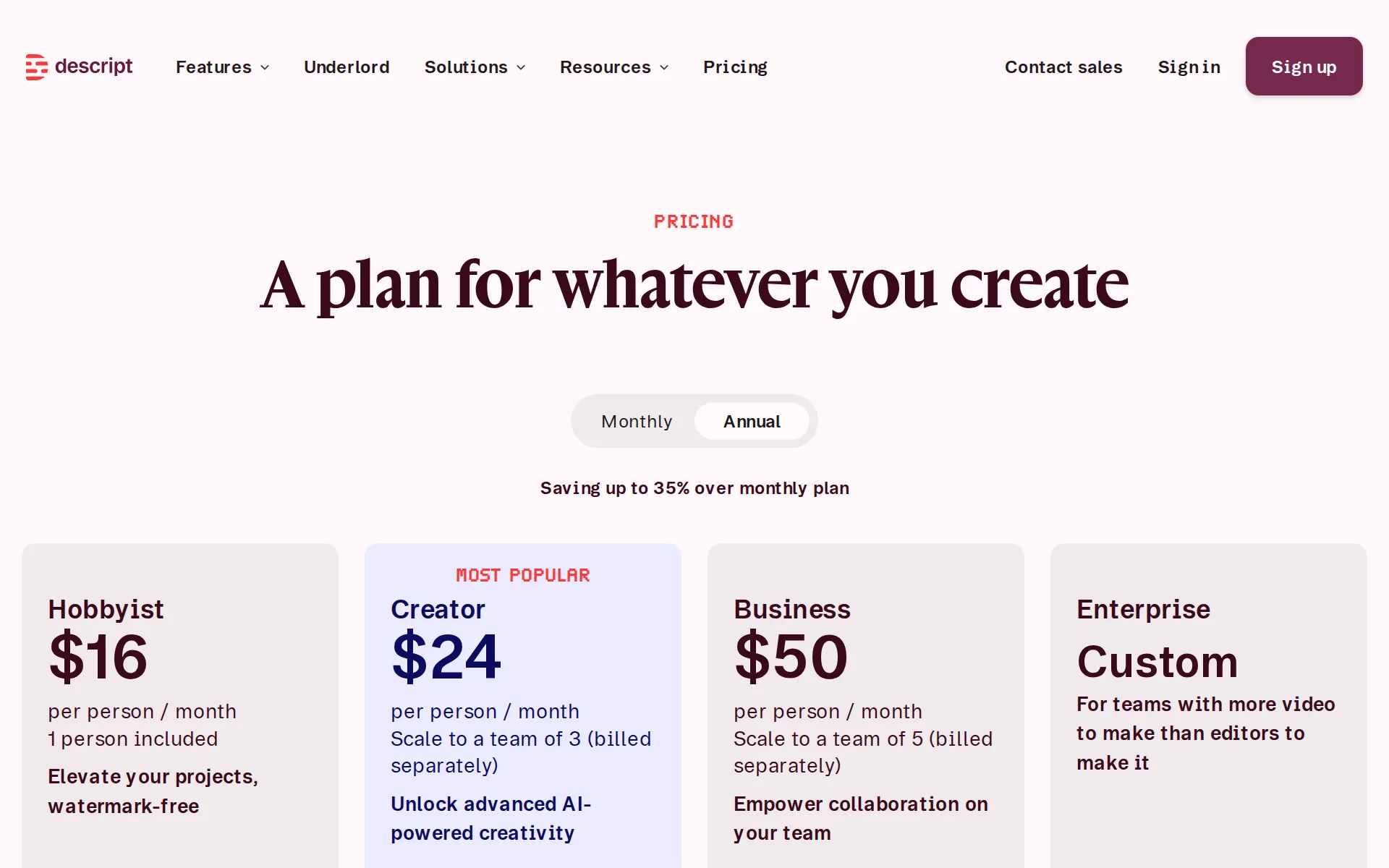
Pricing page, captured
descript.com/pricing, checked
What we checked on Descript
Cost to dub 60 minutes a month
Dubbing is included from the Hobbyist plan upward and is billed in AI credits, but Descript publishes no credits-per-minute rate for a dub, so a buyer cannot price 60 minutes of dubbing in advance.
On current plans, this feature uses AI Credits.
Promotion and regular price
yearly shown monthly: the pricing page opens with the Annual control pressed, so the first figures shown ($16, $24, $50 per person a month) are annual-billing rates; clicking Monthly shows the regular month-to-month prices of $24 Hobbyist, $35 Creator and $65 Business.
Monthly Annual Saving up to 35% over monthly plan
descript.com/pricingChecked
What the price counts
Two separate allowances meter the product: media minutes for everything you upload or record, and AI credits for generative features including text to speech, dubbing and Underlord.
Descript meters usage with two kinds of credit: Media minutes track how much you transcribe and record, and AI Credits are spent on generative AI…
Voices that use more
Descript states that more advanced generative models cost more credits and flags them with a coin-stack icon, but publishes no credits-per-minute figure for any speech model, so the size of the premium is undisclosed.
Model selection. Generative tools let you pick from different models; more advanced models cost more (look for the coin stack icon: more coins =…
Past your allowance
Top ups add usage past the monthly allowance at published prices, from $35 for 350 AI credits down to $0.05 a credit at 4,000, and from $25 for 5 hours of media down to $3.00 an hour at 50 hours, but they are sold only on the Creator and Business plans.
Top ups are only available on Creator and Business plans, shared across all members of your Drive, and expire 12 months after purchase.
Unused credits
Both allowances reset at renewal with nothing carried forward; only separately purchased top ups persist, and those expire twelve months after purchase.
Your allowance resets when your subscription renews at the start of each billing cycle. Unused Media minutes and AI Credits don't roll over into the…
Commercial use
The terms assign you ownership of generated output with no plan-based commercial gate stated, though watermark-free export starts on Hobbyist, so free-plan video carries Descript's watermark.
Both Input and Output are considered User Content under these Terms, and as between you and Descript, you own all right, title, and interest in and…
descript.com/termsChecked
Stock voices
Stock AI speakers are capped by plan at 25+ on Hobbyist and Creator and 60+ on Business, and the catalog draws on ElevenLabs community voices that can disappear without notice.
Stock AI speakers Use professionally designed AI voices for text to speech generation. Limited 25+ 25+ 60+
descript.com/pricingChecked
Languages
The help center lists 19 named text-to-speech languages, and the vendor warns that clones are built on US English pronunciation so accents may not be preserved.
Voice clones are generated using a model based on US English pronunciation, so accents may not always be preserved accurately.
Re-voice your recording
Convert to AI speech replaces your recorded take with a stock or cloned voice from the same script, but the vendor warns the new audio will not match your original timing and offers manual gap fixes.
Convert to AI speech only converts the original audio into AI speech. The new voiceover can run longer or shorter than your original recording,…
Emotion, pace and emphasis
Tone tags let you direct whispering, laughing or pauses per paragraph, but only on the v3 and v4 models, and the vendor says it does not control which exact words a tag applies to.
With the ElevenLabs v3 or v4 model, add tone tags to direct how the AI speaks — for example, telling it to whisper, laugh, sigh, or speak seriously.
Pronunciation fixes
There is no reusable pronunciation dictionary for speech: the documented fix is respelling the word phonetically in the script and then correcting the transcript afterwards, attempt by attempt.
Modify the word's spelling in the script. Experiment with phonetic spellings until you achieve the desired pronunciation.
Long scripts and chapters
A project holds unlimited compositions with markers that become chapters, and single lines can be reworked with Regenerate rather than regenerating a whole script.
Add markers to break your script into sections and export them as chapters.
help.descript.com/llms.txtChecked
Several speakers
A single composition can carry several speakers: you assign a different AI speaker per highlighted passage, and each speaker can also get its own captions layer.
Highlight a paragraph (or any portion of text), press the @ key, and assign a Speaker. Descript will generate TTS audio in that voice for the…
Audio you get
Audio exports offer MP3, WAV and M4A with selectable mono or stereo, 44.1 or 48 kHz sample rate, bitrates to 256 kbps and LUFS normalization presets.
Format Choose from .m4a, .wav, or .mp3.
Instant cloning
You clone your own voice by recording the consent statement once, with the clone usually ready within minutes, and the pricing page puts custom voice clones on the entry Hobbyist plan.
AI Speech with custom voice clones and video regenerate
descript.com/pricingChecked
Professional cloning
There is one clone grade only: the vendor states you cannot add further training data to a clone, and the documented way to improve one is to record the same consent statement again.
You can't add more voice samples or training data to an existing clone, but you can shape the result by:
Consent of the voice’s owner
A recorded consent statement is mandatory before any clone is created, third parties must send their own recording, and clones of deceased or non-consenting people are refused outright.
Descript requires explicit recorded authorization from the person whose voice will be used before creating a voice clone. This protects against…
Your voice trains their models
Data sharing can be switched off in the Profile settings and is off by default on Enterprise, but the terms still let staff and contractors listen to training audio and generate test utterances with your clone for quality checks.
our employees, vendors, and contractors (including Amazon Mechanical Turk workers) may listen to audio samples of your Training Audio and your…
descript.com/termsChecked
Video dubbing
Dub speech translates your script and lays a new translated voiceover track over your video in 28 listed languages, assigning each speaker label a voice for the dub.
Dub speech translates your script into another language and creates a new voiceover using Speakers.
Lip sync
Lip sync adjusts the speaker's mouth to the translated audio, but the plan table withholds it from Free and Hobbyist and from legacy plans entirely, starting at Creator.
On the page: Feature availability by plan table, Lip-sync row
Editing the translation
Correcting the translated script before the final audio needs translation proofread, which the plan table restricts to Business and Enterprise; below that you can swap speakers and regenerate but not edit the translation.
If you make corrections to a translated composition (available to Business and Enterprise drives), you'll need to use Regenerate to create the…
How long a video you can dub
Descript publishes no per-dub length limit, but upload size and resolution are capped by plan, from 1 GB and 4K on Free to 50 GB and 5K on Business, which bounds the source video.
File size up to 1 GB up to 10 GB up to 20 GB up to 50 GB
descript.com/pricingChecked
Captions and subtitles
Captions are built from the script and styled in the editor, subtitles export as SRT or VTT files, and caption translation is offered in 61 listed languages.
Subtitles export as a separate file you upload alongside your video.
Voice to video
Voiceover sits on your video in the same project, but generated speech is not retimed to the picture: the vendor documents freeze frames, B-roll and clip-speed changes as the way to cover resulting gaps.
Descript's Convert to AI speech feature replaces your original audio with an AI voice, but doesn't retime your video to match the new voiceover. This…
Team seats
Several people can edit in one drive, each paid Editor seat costing the plan's own per-person price, so a second Business Editor adds $65 a month; the plan cards cap seats at 1 on Hobbyist, up to 3 on Creator and up to 5 on Business.
1 Editor on a Business drive ($65/month) ... Next renewal (1st of the following month): 2 Editors x $65 = $130/month.
API
A documented REST API with tokens, jobs and an OpenAPI spec exists, is free to paying users, and is presented as early access rather than general availability.
API access is available for all paying users at no additional cost. Usage draws from the AI credits and media minutes on your plan.
descript.com/apiChecked
API price
No separate rate per million characters or per minute of audio is published for the API: work started through it draws on the same monthly media minutes and AI credits as work done in the app, and credit costs vary by media length and model with no flat rate stated.
Imports and Underlord edits started from the Descript API or Descript MCP use the same media minutes and AI credits as work you do in the app.
Publishes to YouTube
You publish straight to your own YouTube channel with markers becoming chapters, but only from the web app, not for Shorts or brand channels, and resolution and length are capped by plan.
Brand and shared access YouTube channels are not supported. Only channel owners can publish directly from Descript.
Platforms
web, windows, mac: the desktop app runs on macOS and Windows and a browser version runs at web.descript.com, while the vendor states mobile browsers and tablets are not supported for editing.
Descript is not officially supported on mobile browsers or tablet devices like Chromebooks or iPads. You may be able to preview playback, but editing…
Works inside
Timeline exports open in Premiere, Final Cut Pro, Pro Tools, Logic and Audition, and the product imports from Zoom and Google Drive and publishes to YouTube, Wistia, HubSpot and podcast hosts.
Export your Descript timeline to Premiere Pro, Final Cut Pro, DaVinci Resolve, Pro Tools, and more, with edits and media intact.
help.descript.com/llms.txtChecked
Who owns the audio
You own your input and output and keep access to projects after canceling, but the terms warn the copyright status of generated output may be unclear, and a license to Descript survives.
You also understand and acknowledge that the copyright status of the generated Output may not be clear and that the use of such Generative Tools may…
descript.com/termsChecked
Free plan or trial
A standing $0 plan lets you write a script and generate speech before paying, but it caps you at 1 hour of media a month, 100 one-time AI credits and 720p exports that carry a watermark, and no credit card is asked for.
Free $0 Get started on your creative journey with text-based editing and give our AI tools a spin.
descript.com/pricingChecked
What the free plan leaves on your audio
Watermark-free video export is excluded from the Free plan and listed as included from Hobbyist up, so free exports carry a watermark; the vendor states no separate commercial restriction.
Elevate your projects, watermark-free
descript.com/pricingChecked
Still sold
live: plans are on sale to new customers today with self-serve checkout links for Hobbyist, Creator and Business, and the vendor is still shipping features such as the early-access API.
A plan for whatever you create
descript.com/pricingChecked
Sign up without a sales call
Hobbyist, Creator and Business all check out online through Stripe-processed card billing; only Enterprise routes through a sales conversation.
Descript Hobbyist, Creator, and Business plan subscriptions are processed automatically to the credit card you provide, according to your selected…
descript.com/pricingChecked
Contract and cancelling
Monthly and annual billing are both offered with annual discounted, and you cancel yourself in the app's Plan tab, staying on the paid plan until the cycle ends.
You can easily cancel your subscription from your Descript subscription page. You can also delete your account and permanently wipe your data from…
descript.com/pricingChecked
Support
Email tickets and the knowledge base are open to everyone, but live chat with a person is for paid plans only, weekdays 5 a.m. to 5 p.m. Pacific, with an SLA from Business up.
Our support team humans are available Monday—Friday from 5 a.m. to 5 p.m. Pacific Time. Available to paid plans.
Descript alternatives
All 9 alternatives6 more alternatives
All 9 publish a price.
- SpeechmaFree, then $9 a monthFree text to speech and creator audio tools with no account or credit card.
- AkoolFree, then $12 a seat a monthAI video suite with video translation, lip sync, text to speech, voice cloning and a voice changer.
- TopMediaiFrom $35.99 a monthAI studio for text to speech, voice cloning and video dubbing on one shared credit balance.
- Fish AudioFree, then $15 a monthExpressive text-to-speech, voice cloning and long-form studio with a credit-metered API.


Sources and changes
Last changed
Sources18
- descript.com/pricing
- help.descript.com/billing-payments-plans/track-and-understand-your-media-minutes-and-ai-credits.md
- help.descript.com/ai-speech/custom-speaker.md
- help.descript.com/repurpose/dubbing.md
- descript.com/terms
- help.descript.com/ai-speech/convert-to-ai-speech.md
- help.descript.com/ai-speech/tts.md
- help.descript.com/llms.txt
- help.descript.com/ai-speech/pronunciation.md
- descript.com/api
- help.descript.com/billing-payments-plans/overview.md
- help.descript.com/billing-payments-plans/top-ups.md
- help.descript.com/connect-with-us/get-help.md
- help.descript.com/export-and-share/audio.md
- help.descript.com/export-and-share/subtitles.md
- help.descript.com/export-and-share/youtube.md
- help.descript.com/getting-started/descript-system-requirements.md
- help.descript.com/repurpose/translate-overview.md
What changed on this page3
- Dubbing features, free tier, plan limits, plans
- Dubbing features, free tier, license terms, plans
- Plan limits
Is this yours?
Claim this listing for free to see who reads it and mark it as yours. You confirm it with an email at descript.com.
Report an error if a fact is wrong.