
Changed since our last check
Since we checked on .
- Re-voice your recording: Partly, now Yes.
- Audio you get: Partly, now Yes.
- Instant cloning: Partly, now Yes.
- Platforms: Yes, now Partly.
- Who owns the audio: Yes, now Partly.
- Support: Partly, now Yes.
Maestra price and terms
Terms
- Free to start
- PartlyPartlyA free video-dubbing trial is offered
The terms in full
the tool says it is a free trial and does not publish a standing free-plan allowance.
- Sign up without sales
- YesYes
What needs a higher plan
- Voiceover Business
- Cost for 10 hours a month (heavy use)
- Premium
- Voices that use more, Team seats, API
- Business
- Lip sync
For AI agents
- API
- PartlyPremium
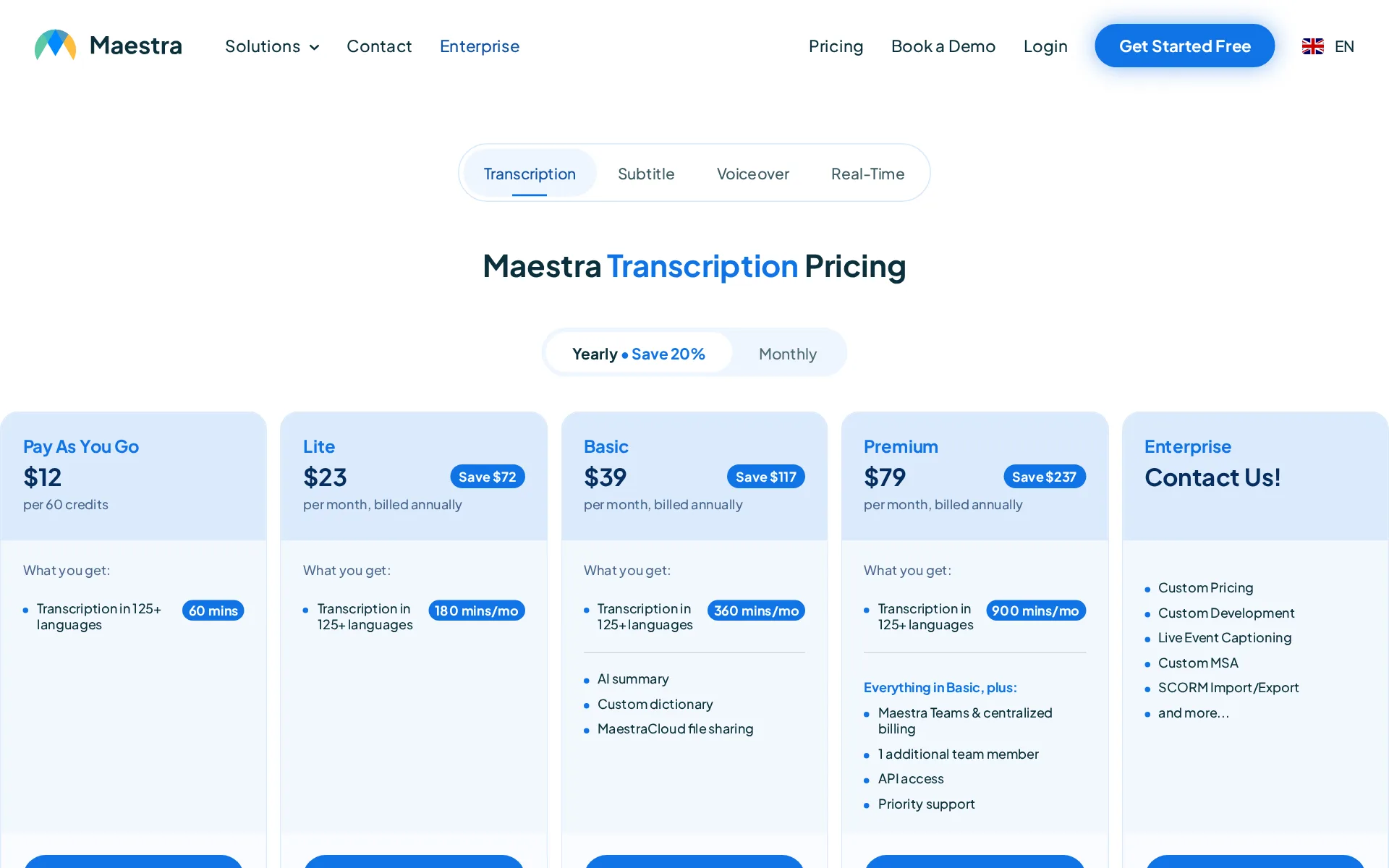
Pricing page, captured
maestra.ai/pricing, checked
What we checked on Maestra
Cost for 2 hours a month
Two hours of finished speech a month is exactly the Voiceover Basic allowance, $49 month-to-month, but that allowance is specifically voiceover into another language and excludes the pro voices and voice cloning tier.
Basic $49 per month What you get: Voiceover into another language 120 mins/mo
maestra.ai/pricingChecked
Cost for 10 hours a month (heavy use)
Ten hours a month is sold: the Voiceover Business plan includes 600 minutes of voiceover into another language for $199 billed month-to-month, with larger Business Plus and Enterprise steps above it.
Business $199 per month What you get: Voiceover into another language 600 mins/mo
maestra.ai/pricingChecked
Cost to dub 60 minutes a month
The cheapest voiceover plan you can buy, Basic, includes 120 minutes a month of voiceover into another language, so dubbing a 60-minute video into one language fits inside it at $49 a month billed monthly, or $39 a month on yearly billing.
On the page: Maestra Voiceover Pricing, Basic plan card, price cell and "What you get" list, Monthly billing selected
maestra.ai/pricingChecked
Promotion and regular price
The operated billing control labels annual billing as a 20 percent saving while the monthly rate remains available.
Yearly • Save 20%
maestra.ai/pricingChecked
What the price counts
Voiceover subscriptions meter translated voiceover in monthly minutes, with a separate smaller pro-voice allowance.
$99 per month What you get: Voiceover into another language 300 mins/mo or Pro voices & voice cloning 100 mins/mo
maestra.ai/pricingChecked
Voices that use more
The Premium allowance names 300 translation minutes or 100 pro-voice and cloning minutes in one monthly plan.
Voiceover into another language 300 mins/mo or Pro voices & voice cloning 100 mins/mo
maestra.ai/pricingChecked
Past your allowance
Transcription and subtitles sell top-up credits at $12 per 60 credits, but the four voiceover plan cards list no pay-as-you-go pack and no per-minute overage rate, so what happens when a voiceover allowance runs out is not priced on this page.
Pay As You Go $12 per 60 credits
maestra.ai/pricingChecked
Stock voices
The voice-cloning page says users can choose from more than 800 AI voices across accents, styles, and tones.
Listen to and try out 800+ AI voices in a wide range of accents, styles, and tones
Languages
The vendor says dubbing works across more than 125 languages, while cloning works in more than 30 languages and 50 accents.
AI voice cloning in 30+ languages and 50+ accents.
Re-voice your recording
Video dubbing can replace a speaker with a cloned or library voice while pacing is adjusted to original timing.Was Partly before our last check.
Pick from a rich voice library, clone the original speaker's voice, enable lip sync, and fine-tune voice, pacing, and emotional delivery in the…
Emotion, pace and emphasis
The dubbing editor lets users adjust line delivery and use named emotional styles from calm to urgency.
Adjust the emotional tone of each dubbed line, from calm narration to urgency, excitement, or any delivery style.
Pronunciation fixes
A reusable custom dictionary with per-word importance ranks exists from the Basic plan, but the vendor documents it as improving transcription accuracy rather than fixing how a voice says a name.
The goal of the custom dictionary is to help the software transcribe chosen words more accurately.
Long scripts and chapters
A whole file is handled as one project with per-line editing, splitting, merging and selective regeneration, but the vendor documents no chapter structure for book-length work.
On the right side of the text, the "+" button adds a line and the button next to it merges lines.
Several speakers
Dubbing can identify speakers and assign distinct dubbed voices to preserve multi-character dialogue.
Identify different speakers in your video and assign distinct dubbed voices to each one
Audio you get
Dubbing exports an MP4 video and separately downloadable MP3, WAV, and other audio formats.Was Partly before our last check.
export as MP4 with the dubbed audio. Download audio tracks separately in MP3, WAV, or other formats.
Instant cloning
A short one-to-two-minute clear voice recording is enough for the vendor’s described cloning workflow.Was Partly before our last check.
upload an audio file where you speak clearly for at least 1-2 minutes.
Consent of the voice’s owner
Uploaders must warrant they own the necessary rights or have secured them before supplying voice data.
you own all rights, title, and interest in and to the Customer Data, or have otherwise secured all necessary rights
maestra.ai/terms-of-serviceChecked
Your voice trains their models
The privacy policy permits use of user content to operate and improve the service, but gives no clone-specific opt-out.
provide, administer, and improve our Service
maestra.ai/privacy-policyChecked
Video dubbing
Users can upload video, choose source and target languages, and create dubbed output in the browser.
Upload from your device, Dropbox, or paste a link. Select the source language and your target language for AI dubbing.
Lip sync
Lip sync is available from the Business Voiceover plan and carries a published two-dollar-per-minute charge.
Unlock lip-sync ($2/min)
maestra.ai/pricingChecked
Editing the translation
Before export, the browser editor lets users revise voice, pacing, emotional delivery, timing, and volume.
Adjust voice selection, pacing, emotional delivery, timing, and volume directly in the browser before exporting
How long a video you can dub
The YouTube workflow warns that videos longer than 30 minutes might have problems, without plan-by-plan upload caps.
Youtube videos over 30 minutes might have problems
Captions and subtitles
The product generates, edits, translates, and exports timed subtitles, including downloadable SRT and VTT files.
Generate or import, edit, translate, and export perfectly timed subtitles. Burn them into videos or download as SRT/VTT, and more.
maestra.aiChecked
Voice to video
The dubbing editor plays video with replacement voices and supports pacing changes that preserve on-screen timing.
The dubbing editor plays your video with the new voices in place.
Team seats
Premium includes one additional team member and Business includes two, but individual additional-seat prices are not published.
1 additional team member
maestra.ai/pricingChecked
API
The public API is documented, but the Voiceover plan table lists API access from Premium.
On the page: Voiceover plan table, Premium column
maestra.ai/pricingChecked
Publishes to YouTube
The YouTube workflow can send chosen subtitle languages to a connected channel after exporting from Maestra.
Captions were pushed to YouTube
Platforms
The workflow runs in a browser, while voice cloning is explicitly described for both mobile and desktop use.Was Yes before our last check.
directly in the browser before exporting your final dubbed video
Works inside
Maestra lists YouTube, TikTok Ads, Zoom, Teams, Slack, Zapier, OBS, vMix, and webhook connections.
Automate Maestra's transcription, captioning, and voiceover workflows by connecting to 2,000+ web services.
maestra.ai/integrationsChecked
Who owns the audio
The terms retain users’ rights to uploaded customer data, but do not expressly state ownership of generated audio.Was Yes before our last check.
You retain all of your rights to your Customer Data.
maestra.ai/terms-of-serviceChecked
Free plan or trial
Anyone can try a free trial without an account, but it is a trial rather than a standing plan.
free AI video dubbing through the free trial
Still sold
The vendor actively offers signup and paid Voiceover subscriptions, indicating the product is live for new customers.
Get Started for Free
maestra.aiChecked
Sign up without a sales call
The public Voiceover plan table provides Subscribe Now links for Basic through Business Plus plans.
On the page: Voiceover plan table, paid plan purchase links
maestra.ai/pricingChecked
Contract and cancelling
Subscriptions can renew monthly or annually, and account settings allow changes or cancellation before renewal.
monthly or annual payment
maestra.ai/terms-of-serviceChecked
Support
Support is available by email at support@maestra.ai, and the contact form promises a reply from a person.Was Partly before our last check.
You'll hear back from a real person, not a bot.
maestra.ai/contactChecked
Maestra alternatives
All 9 alternatives6 more alternatives
All 9 publish a price.
- Murf AIFrom $29 a monthVoice-over Studio with timeline video syncing, downloadable audio, dubbing, and a public API.
- AkoolFree, then $12 a seat a monthAI video suite with video translation, lip sync, text to speech, voice cloning and a voice changer.
- VoicemakerFree, then $5 a monthCredit-metered AI text-to-speech studio with 2,000+ voices, voice cloning, speech-to-speech and SRT export.
- TopMediaiFrom $35.99 a monthAI studio for text to speech, voice cloning and video dubbing on one shared credit balance.


Sources and changes
Last changed
Sources on maestra.ai14
What changed on this page3
- Dubbing features, free tier, license terms, plan limits, plans
- Dubbing features, free tier
- Dubbing features, free tier, license terms, plans
Is this yours?
Claim this listing for free to see who reads it and mark it as yours. You confirm it with an email at maestra.ai.
Report an error if a fact is wrong.