


Riverside price and terms
Terms
- Free plan
- YesYes
The terms in full
Free includes 2 hours of multi-track recordings, 720p video, 44.1 kHz audio, unlimited single-track recording and editing, and a Riverside watermark.
- Sign up without sales
- YesYes
What needs a higher plan
- Business
- Languages, Video dubbing, Lip sync, Editing the translation, How long a video you can dub, Team seats
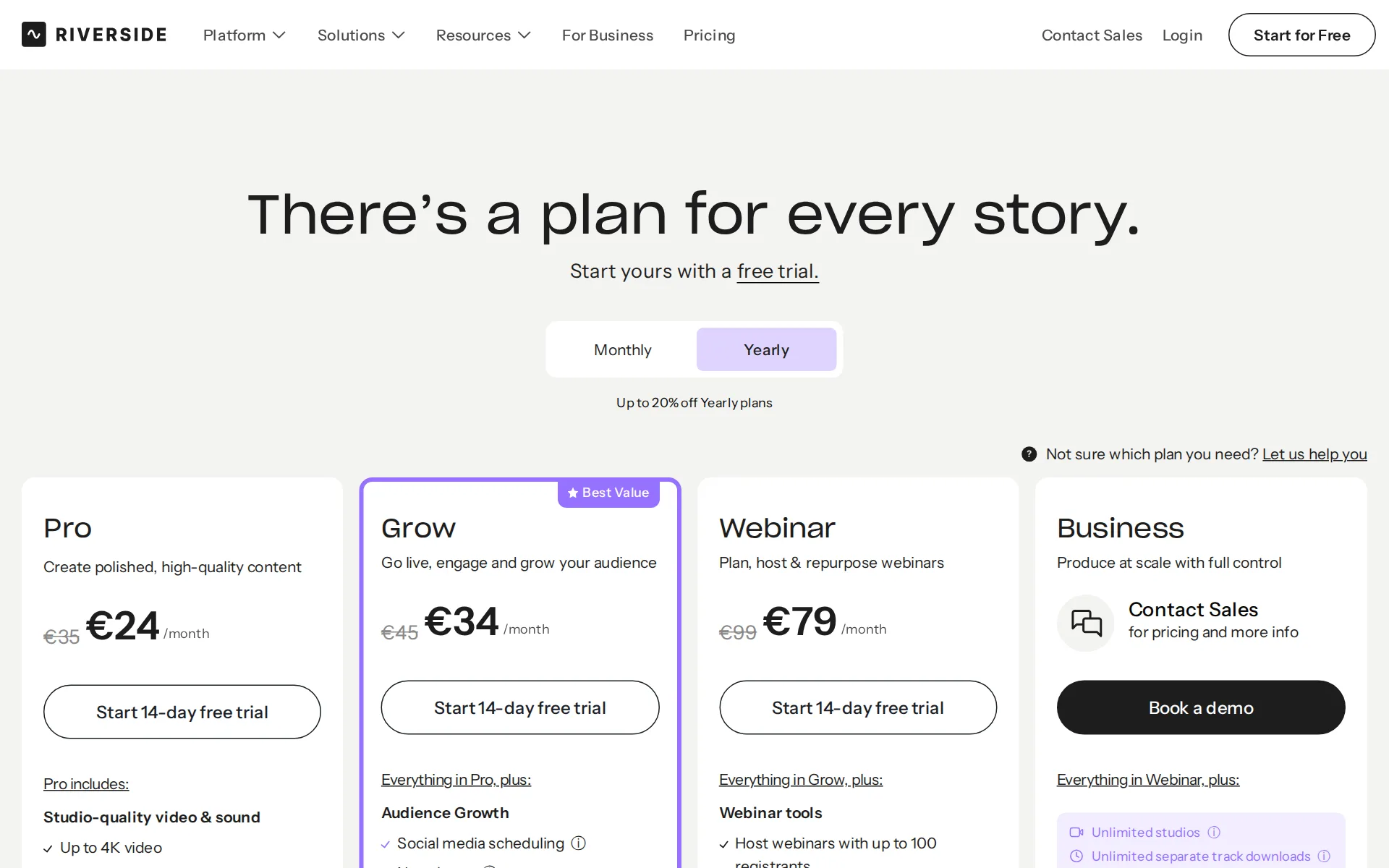
Pricing page, captured
riverside.com/mobile, checked
What we checked on Riverside
Promotion and regular price
none; the entry price is the month-to-month Pro rate, while annual billing shows a lower per-month figure.
Annual billing saves you up to 20% - Pro drops from $29 to $24/month
riverside.com/pricingChecked
What the price counts
The service uses AI Credits for select generative features, while the core recording and editing subscriptions are recurring flat plans.
AI Credits power select features like AI Translation, AI B-Roll, and Animated Clips.
riverside.com/pricingChecked
Past your allowance
After included AI Credits are spent, Riverside says more can be purchased, but it does not publish a top-up price.
Once credits are used, you can purchase more.
riverside.com/pricingChecked
Languages
Business AI Translation voices recordings in more than 30 languages, but the page does not enumerate accents or regional voice choices.
Translate, voice, and lip sync your recordings in 30+ languages
riverside.com/ai-translationChecked
Re-voice your recording
VideoDub regenerates corrected lines in the original speaker's own voice rather than offering a different selected voice for the recording.
regenerate the audio to say it correctly in the speaker’s own voice, tone, and pacing.
riverside.com/faqChecked
Several speakers
A recording can include up to ten participants on separate tracks, and AI Translation handles up to four speakers per video.
You can record up to 10 participants (9 guests + the host) on separate, high-quality audio and video tracks.
riverside.com/faqChecked
Audio you get
Recordings provide uncompressed 48 kHz WAV audio, while the service also accepts MP3, WAV, MP4, and MOV uploads.
Plug in your mic and give in to the immersive experience of 48kHz WAV files
riverside.com/recordingChecked
Consent of the voice’s owner
A user must complete Riverside's consent process and obtain explicit informed consent when synthesizing another person's voice or likeness.
Before using a Synthetic Media Tool in respect of any Depicted Individual, you must complete Riverside’s in-Platform consent process for that…
Your voice trains their models
Riverside may use user inputs and outputs to train, fine-tune, and improve its AI models; no general opt-out is published here.
Riverside may use your Inputs and Outputs to train, fine-tune and improve its AI models and services.
Video dubbing
Business AI Translation translates uploaded or Riverside-recorded videos using speaker-specific cloned voices that match each original speaker.
AI Translation uses speaker-specific voice cloning to create natural-sounding translations that closely match each person’s original voice
riverside.com/ai-translationChecked
Lip sync
Business AI Translation can match mouth movements to translated audio, but the vendor makes this an optional translation setting.
lip sync is optional — you can choose whether or not to apply it during the translation process.
riverside.com/ai-translationChecked
Editing the translation
Business AI Translation provides a fully editable translated transcript and the regular text-based editing tools before final export.
the translated transcript is fully editable, and you can use all of Riverside’s text-based editing tools
riverside.com/ai-translationChecked
How long a video you can dub
Business translation supports up to four speakers and requires uploaded or Riverside-recorded videos to be under 60 minutes long.
You can use AI Translate on both videos you upload and Riverside recording, as long as they’re under 60 minutes
riverside.com/ai-translationChecked
Captions and subtitles
The editor creates captions and allows transcript downloads as SRT files for closed captions on other platforms.
You can also download an SRT file from your project dashboard to upload as closed captions on other platforms.
riverside.com/captionsChecked
Voice to video
The in-product editor synchronizes transcript changes to video and provides timeline tools for trimming, cutting, splitting, and arranging tracks.
The transcript syncs with your recording, so text edits automatically update your video.
riverside.com/transcriptionChecked
Team seats
Business has collaborative editing and custom roles built in; lower paid plans offer an additional editor seat as an add-on without a public price.
Business is the only plan with collaborative editing and custom roles built in.
riverside.com/pricingChecked
Publishes to YouTube
Riverside can publish and schedule video content to YouTube directly through its platform and through its MCP-connected AI workflows.
Publish and schedule to YouTube, TikTok, Instagram, Facebook, and X, straight from your chat.
riverside.com/mcpChecked
Platforms
Riverside runs on the web, mac, ios, and android; its mobile page names iPhone, iPad, and Android support.
Use your iPad, iPhone, or Android
riverside.com/mobileChecked
Works inside
Riverside connects with publishing, webinar, social, and editing tools including HubSpot, Spotify, YouTube, Premiere Pro, and Final Cut Pro.
Sync webinar registration and attendance data with HubSpot and Salesforce.
riverside.com/mobileChecked
AI labelling
Synthetic-media output receives machine-readable marking intended to identify it as artificially generated or manipulated.
Riverside will apply machine-readable marking to output from Synthetic Media Tools intended to make it detectable as artificially generated or…
Who owns the audio
Uploaded and generated content remains the user's property under the terms, though the terms grant Riverside a service and model-improvement license.
The Content and any copyright or trademark rights thereto is and shall remain your property
Free plan or trial
A standing no-cost plan lets a buyer record, edit, use Magic Clips, and make two hours of multi-track recordings.
Try 2 hours of multi-track recordings
riverside.com/pricingChecked
What the free plan leaves on your audio
The standing Free plan places a Riverside watermark on all created items, while paid Pro lists no watermark.
Riverside watermark on all your things
riverside.com/pricingChecked
Still sold
live; Riverside presents current self-service plans, active applications, and a working product platform for new customers.
There’s a plan for every story.
riverside.com/pricingChecked
Sign up without a sales call
A buyer can start the standing Free plan and purchase the public Pro, Grow, or Webinar subscriptions without contacting sales.
You will switch to the pro plan for $288 per year.
riverside.com/pricingChecked
Contract and cancelling
Buyers can choose monthly or yearly billing and can cancel future charges through the account dashboard, email, or support chat.
TO CANCEL SUCH AUTOMATIC RENEWAL, YOU MUST UNSUBSCRIBE ... BY LOGGING INTO YOUR ACCOUNT ON THE PLATFORM AND CANCELLING
Support
The terms direct customers to email or the platform's support chat for cancellation and support, without published response hours.
On the page: Terms and Conditions, section 8.1 Fees; Payment Terms
Riverside alternatives
All 9 alternatives6 more alternatives
All 9 publish a price.
- Murf AIFrom $29 a monthVoice-over Studio with timeline video syncing, downloadable audio, dubbing, and a public API.
- VoicemakerFree, then $5 a monthCredit-metered AI text-to-speech studio with 2,000+ voices, voice cloning, speech-to-speech and SRT export.
- SpeechmaFree, then $9 a monthFree text to speech and creator audio tools with no account or credit card.
- TopMediaiFrom $35.99 a monthAI studio for text to speech, voice cloning and video dubbing on one shared credit balance.


Sources and changes
Last changed
Sources on riverside.com9
What changed on this page1
- Dubbing features, free tier, license terms, plan limits, plans
Is this yours?
Claim this listing for free to see who reads it and mark it as yours. You confirm it with an email at riverside.com.
Report an error if a fact is wrong.