
VEED price and terms
Terms
- Free plan
- YesYes
The terms in full
Standing $0 plan, no card required: 50 AI credits a month, up to 10 minutes of text to speech, 10 min/mo of auto subtitles, 720p watermarked exports capped at 10 minutes, 2GB storage, one Voice Clone try, and one-shot tries of most AI editing tools. Subtitle download and the iOS app are excluded.
- Sign up without sales
- YesYes
What needs a higher plan
- Pro
- Cost for 10 hours a month (heavy use), Pronunciation fixes
- Studio
- Cost to dub 60 minutes a month
- Enterprise
- Editing the translation, Works inside
For AI agents
- API
- Partly
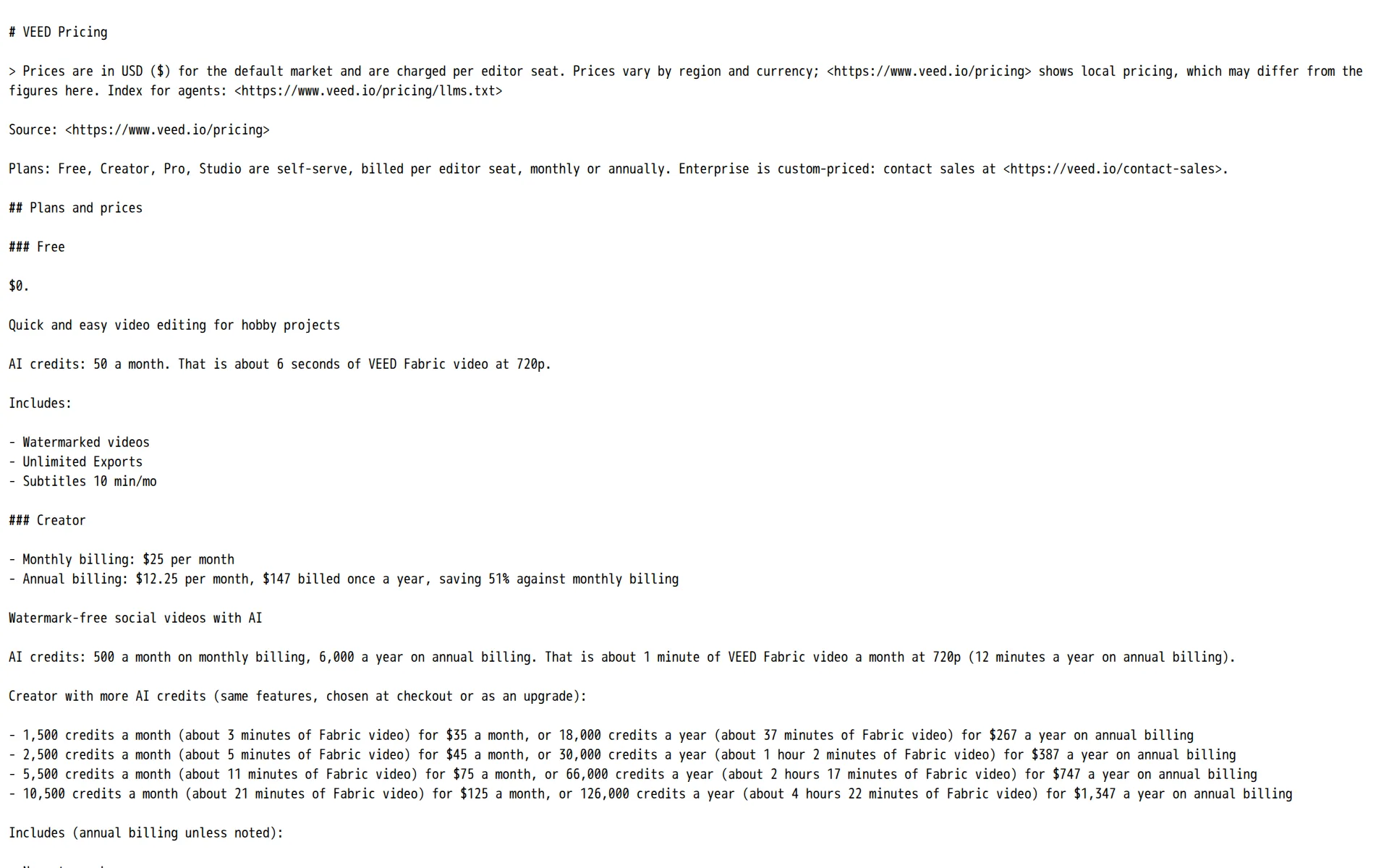
Pricing page, captured
veed.io/pricing/index.html.md, checked
What we checked on VEED
Cost for 2 hours a month
$25 a month on Creator for 2 hours of 60 minutes (120 minutes of finished audio). Billing increment not stated: computed per second (60 min a hour). If they round each hour up to the minute (60 min), it is $25. an hour of finished speech is 60 minutes of audio; generation you do not download or keep is not counted where the vendor meters downloads
Monthly billing: $25 per month
Cost for 10 hours a month (heavy use)
$45 a month on Pro for 10 hours of 60 minutes (600 minutes of finished audio). Billing increment not stated: computed per second (60 min a hour). If they round each hour up to the minute (60 min), it is $45. an hour of finished speech is 60 minutes of audio; generation you do not download or keep is not counted where the vendor meters downloads Creator ($25) includes 120 minutes of audio; these hours need 600, and past the allowance speech past it cannot be made.
Monthly billing: $45 per month
Cost to dub 60 minutes a month
Dubbing is sold as an allowance of minutes, not a credit rate: Pro gives 30 min a month on monthly billing and Studio 1 hr a month, so a full 60-minute dub inside one month needs Studio at $79 a month, or Pro on annual billing, whose 6 hr/yr pool covers it at $22.08 a month.
On the page: Feature comparison, AI Localisation table, AI Dubbing row
Promotion and regular price
yearly shown monthly: the pricing page opens with its billing switch already set to Pay yearly, so Creator first reads as the annual-equivalent rate; the regular self-serve month-to-month price for Creator is $25 per editor seat per month.
Annual billing: $12.25 per month, $147 billed once a year, saving 51% against monthly billing
What the price counts
Everything generative is metered in AI credits granted per billing period, while speech, dubbing and translation also carry their own ceilings expressed in minutes or hours of audio per plan, so two units bound the same work.
Your plan includes a set amount of AI credits each month or year to spend on AI generations. Your full allowance refreshes when your subscription…
Past your allowance
There is no per-credit overage purchase: the vendor's answer to running out is to move to a larger credit allowance on the same plan or a higher plan, which it bills as a normal subscription upgrade.
Yes. You can move to a higher credit allowance on your current plan. It works like a normal subscription upgrade, giving your workspace more credits…
Unused credits
Unused AI credits are lost when the subscription renews, and unused translation minutes are lost at the end of the cycle too; the vendor's only suggestion is that annual billing pools the allowance over a longer window.
Credits do not carry over, and you can move to a higher plan whenever you need more.
Commercial use
Watermark-free export, which is what makes published work usable, starts on Creator; the AI content policy grants use of output for any legal purpose but words that grant around AI Images rather than generated audio, so the audio license is not spelled out.
You may use your AI Images for any legal purpose, provided that you comply with these terms and accept that any such use is at your own risk.
Languages
Text to speech covers more than 50 languages with a range of accents and per-language sample pages, while cloned voices and dubbing are limited to 29 languages, so reach depends on which voice you use.
The text-to-speech video maker turns written text into narrations and voiceovers in 50+ languages.
Re-voice your recording
You can hand VEED a recording and get the speech back in another voice, but only through AI dubbing, which is documented solely as translation into a target language; no same-language voice replacement that keeps your original delivery is described.
Our AI dubbing tool translates your video's spoken audio into multiple languages. Dub audio in the original speaker's voice or select one of our…
Emotion, pace and emphasis
Tone is controllable in two documented ways: picking a voice with a given delivery, and inline audio tags that shift tone phrase by phrase; the pages do not describe controls for pace, pauses or emphasis.
You can control voice tone at the phrase level with audio tags
Pronunciation fixes
A Custom Vocabulary dictionary that teaches VEED brand names and industry terms exists from Pro upward, but the vendor describes it as improving recognition in transcription rather than as fixing how a text-to-speech voice pronounces a word.
use the Dictionary feature to add custom vocabulary, such as brand names, proper nouns, and industry terms.. This way, VEED recognizes them correctly…
Long scripts and chapters
Long scripts have to be broken up: the vendor caps a single text-to-speech clip at 5,000 characters for Pro users and a single cloned-voice generation at about four minutes, with no chaptered book project described.
Yes, Pro users can convert 5,000 characters of text to speech per audio clip. Monthly audio limits vary per subscription plan.
Audio you get
An audio-only project downloads as MP3, and adding footage exports MP4 instead; the vendor publishes export quality only for video (720p on Free up to 4K on Pro and above) and states no audio bit rate or WAV option.
Click 'Done' to export. Download the clip as an MP3 audio file, or export as an MP4 if you've added video footage.
Instant cloning
A single short recording read in the browser produces a usable clone in under five minutes, and even the Free plan may create one once, with regular generation then drawing on the paid credit allowance.
Voice cloning in under 5 minutes. Generate natural AI voiceovers in your voice—just type your script
Consent of the voice’s owner
Consent is enforced by design rather than by paperwork: the clone can only be built from a sample you record live, and the script you read aloud contains a spoken consent line confirming the voice is your own.
The recording script includes a consent line you read aloud, which confirms the voice is yours.
Your voice trains their models
Content uploaded on the Free subscription is used to train and develop VEED's AI models; paid subscriptions and mobile uploads are excluded, and the only opt-out for a free user is to leave the free tier or delete the account.
if you do object and opt-out of the Development and Improvement Processing during the term of your 'Free' subscription, please note that you cannot…
veed.io/privacyChecked
Video dubbing
Upload a video, pick a target language, and the spoken track is replaced either by a clone of the original speaker or by a stock voice, with ambient sound retained behind the new speech.
Yes, our voice dubbing software lets you clone the voice of the original speech. Alternatively, select one of our natural-sounding stock voices.
Lip sync
Lip sync is an optional switch in the dubbing setup step that re-times the speaker's mouth to the translated speech, and the same model is also sold on its own through the developer API.
Select your target language and preferred voice. Clone the original voice or choose one of our stock voices. Enable lipsync to match lip movement…
Editing the translation
Correcting the translation before the dub is rendered, and supplying your own SRT, VTT or ASS script, are both reserved for Enterprise; self-serve plans preview and download but cannot proofread the translated script first.
Enterprise users can proofread translations before dubbing. They can also upload SRT, VTT, or ASS subtitle files for more control.
How long a video you can dub
The published dubbing limit is a time allowance per plan, from a single try on Free and Creator to 30 minutes a month on Pro and an hour on Studio; no maximum length or file size for one dub is stated.
On the page: Feature comparison, AI Localisation table, AI Dubbing row
Captions and subtitles
Auto subtitles are unlimited on every paid plan under a 50-hour monthly fair-use cap and translate into 125+ languages, but downloading the subtitle file as SRT, VTT or TXT is blocked on Free.
Burn or hardcode the subtitles into the video or download the subtitle file (SRT, VTT, and TXT).
Voice to video
Voice-over is generated inside the editor and lands straight on the project timeline as an audio clip you can position against the picture, rather than being produced in a separate tool and imported.
Type or paste your text and click Generate. You will see an audio clip in the timeline.
Team seats
Pricing is per editor seat and the plan fee is multiplied by the number of editors in the workspace, with Free, Creator and Pro capped at three editors, Studio at five, and reviewer seats only from Studio upward.
Our plans are charged on a 'per seat' basis so the amount of the plan is multiplied by the number of editors in your workspace. You will be charged…
API
A separate developer API with its own keys and workspace exists, but its published model list covers lipsync, talking-image video, background removal and audio cleanup only: there is no text-to-speech, voice cloning or dubbing endpoint.
On the page: Endpoints section, full endpoint list
api.veed.io/llms.txtChecked
API price
API rates are public and billed per completed job by the second, frame or minute of media rather than per character of speech, since no speech endpoint is offered: Lipsync 2.0 is $0.07 a second and audio cleanup $0.0125 a minute.
Every model is priced per second, frame, or minute of media. A job is only billed once it completes. Prices are in USD.
api.veed.io/pricing.mdChecked
Publishes to YouTube
A YouTube channel can be connected to a VEED account through YouTube's API, but the vendor's own YouTube workflow ends at downloading the file and uploading it yourself, and no dubbed second audio track feature is described.
Upload the recorded file to VEED and start editing. You can then download the edited video to your device and upload it to YouTube!
Platforms
web, windows, mac, ios, android: it runs in any current browser on desktop and mobile, and there is additionally a native iOS app that the comparison table withholds from the Free plan.
VEED also works on any device - Mac, iPhone, iPad, Windows, Android, and Linux.
veed.io/tools/video-editorChecked
Works inside
The plan comparison lists Integrations as absent from Free, Creator, Pro and Studio and present only on Enterprise, so a self-serve buyer gets no connection into Canva, Adobe or a CMS.
On the page: Feature comparison, Collaboration & Brand Management table, Integrations row
AI labelling
VEED documents no watermark, metadata tag or checking tool for AI-generated audio: it places the disclosure duty on the creator instead, asking users to tell viewers themselves that the content was made with AI.
When using AI Images in your VEED Limited designs, we ask that you let viewers of your designs know that the content is AI-generated.
Who owns the audio
The vendor disclaims copyright ownership and lets you use the output for any legal purpose, but the clause is written about AI Images and grants VEED a hosting and marketing license; nothing states what happens to the license after you cancel.
you own your AI images and give Veed Limited the right to host them on our platform and use them to market and improve our products and services.…
Free plan or trial
A standing $0 plan with no card required gives 50 AI credits a month, ten minutes of auto subtitles and up to ten minutes of text to speech, plus one-shot tries of most AI editing tools.
AI credits: 50 a month. That is about 6 seconds of VEED Fabric video at 720p.
What the free plan leaves on your audio
Free exports carry a VEED watermark and are capped at 720p and ten minutes, with watermark-free export beginning on Creator; the vendor states no separate commercial restriction on free output.
On the page: Feature comparison, Video creation table, Watermark-free Exports row
Still sold
live: the plan ladder is on sale to new customers today, with self-serve checkout on four published tiers and a contact-sales route for Enterprise and education.
Plans: Free, Creator, Pro, Studio are self-serve, billed per editor seat, monthly or annually. Enterprise is custom-priced
Sign up without a sales call
Four of the five plans are bought online by card, PayPal or Apple and Google Pay through Stripe, with no sales conversation; only Enterprise, education and team trials route through a contact form.
Plans: Free, Creator, Pro, Studio are self-serve, billed per editor seat, monthly or annually. Enterprise is custom-priced: contact sales
Contract and cancelling
Both monthly and annual terms are sold, and cancellation is a self-service switch in the dashboard rather than a request, with access continuing to the end of the paid cycle.
Yes, absolutely. If you want to cancel your plan, simply go to your dashboard and select 'Team Billing' in the top left dropdown and click on 'Turn…
Support
Human chat support starts on Creator; the Free plan reaches only an AI chatbot, and the sole published hours are Enterprise's 24/5, so paid self-serve buyers get chat with no stated response window or email channel.
On the page: Feature comparison, Support table, Support row
VEED alternatives
All 9 alternatives6 more alternatives
All 9 publish a price.
- SpeechmaFree, then $9 a monthFree text to speech and creator audio tools with no account or credit card.
- Murf AIFrom $29 a monthVoice-over Studio with timeline video syncing, downloadable audio, dubbing, and a public API.
- TopMediaiFrom $35.99 a monthAI studio for text to speech, voice cloning and video dubbing on one shared credit balance.
- Fish AudioFree, then $15 a monthExpressive text-to-speech, voice cloning and long-form studio with a credit-metered API.


Sources and changes
Last changed
Sources13
- veed.io/pricing/index.html.md
- veed.io/tools/voice-dubber/ai-dubbing
- veed.io/terms-of-use/ai-tools
- veed.io/tools/ai-voice-cloning
- veed.io/tools/text-to-speech-video
- veed.io/create/youtube-video-maker
- api.veed.io/llms.txt
- api.veed.io/pricing.md
- veed.io/privacy
- veed.io/tools/auto-subtitle-generator-online
- veed.io/tools/text-to-speech-video/ai-voice-generator
- veed.io/tools/video-editor
- veed.io/tools/video-translator
What changed on this page1
- Dubbing features, free tier, license terms, plan limits, plans
Is this yours?
Claim this listing for free to see who reads it and mark it as yours. You confirm it with an email at veed.io.
Report an error if a fact is wrong.