
Vozo price and terms
Terms
- Free plan
- YesYes
The terms in full
Standing $0 Free plan: 20 AI points, which the card puts at about 6 AI dubbing minutes, 2 lip sync minutes and 2 visual translate minutes; limited AI Translation of 3 projects, all AI tools usable on up to 3 projects, 1 seat and 1 concurrent task, up to 20 min per video, and no credit card required. The watermark is only listed as removed from the Creator plan up.
- Sign up without sales
- YesYes
What needs a higher plan
- Studio
- Cost for 2 hours a month, Publishes to YouTube
- Studio XXL
- Cost for 10 hours a month (heavy use)
For AI agents
- API
- Yes
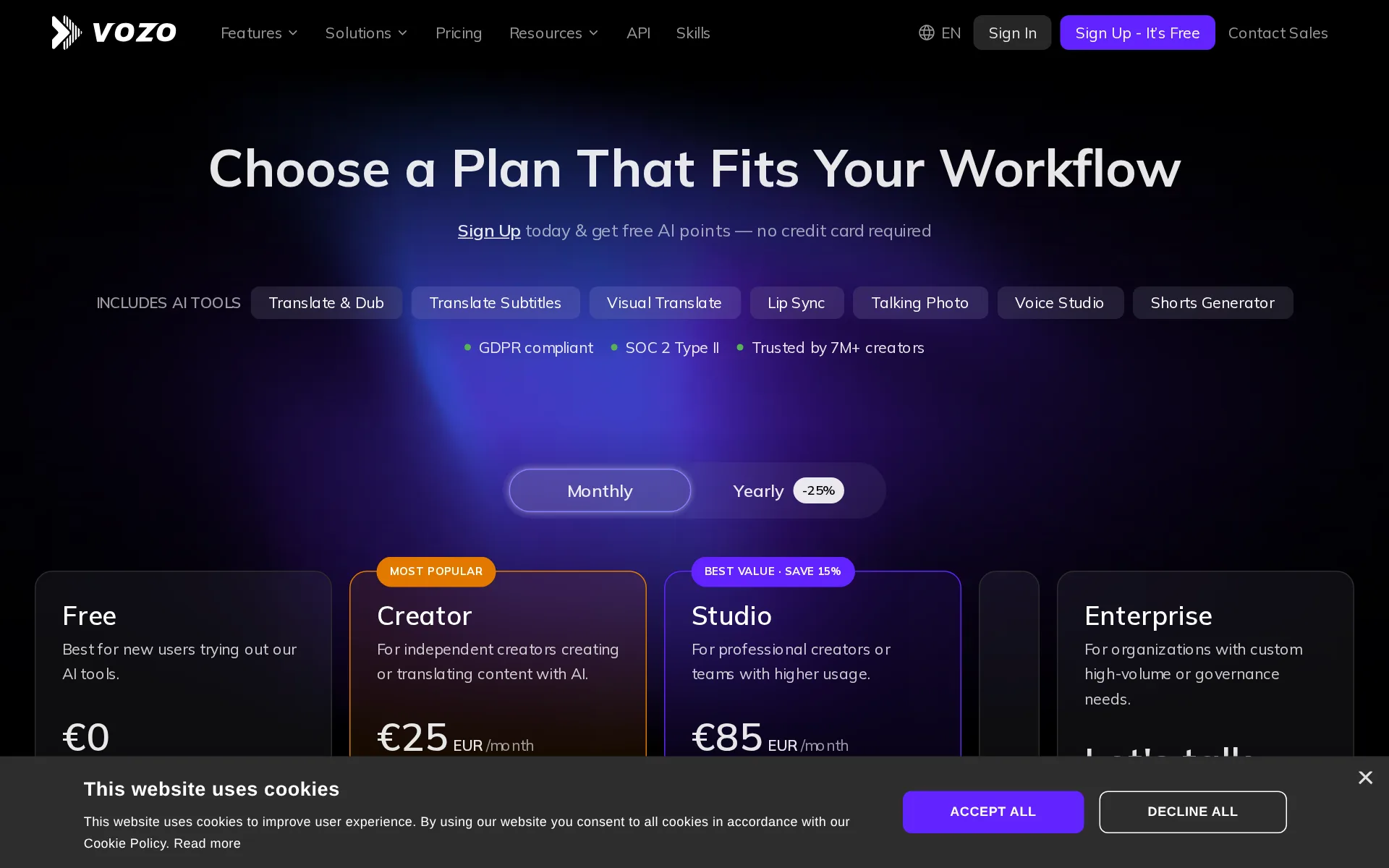
Pricing page, captured
vozo.ai/pricing, checked
What we checked on Vozo
Cost for 2 hours a month
$99 a month on Studio for 2 hours of 60 minutes. Billing increment not stated: computed per second (60 min a hour). If they round each hour up to the minute (60 min), it is $99. credits counted per character or per word are converted at the standard hour: 52,000 characters, 9,300 words Creator might cost less, but no overage price is published, so it could not be priced past its allowance.
Studio For professional creators or teams with higher usage. $99 USD /month Billed monthly - cancel anytime
vozo.ai/pricingChecked
Cost for 10 hours a month (heavy use)
Ten hours of speech a month is 1,800 points, above Studio XL's 1,500, so only Studio XXL with 4,000 points covers it; the plan rendered for my region priced it in euros rather than the US dollars quoted lower on the same page.
Studio XXL For the highest-volume production and usage. €569 (about $636) EUR /month Billed monthly - cancel anytime Unlimited AI Translation 4,000 AI points /…
vozo.ai/pricingChecked
Cost to dub 60 minutes a month
Vozo prices dubbing per minute of the video you upload: 3 AI points a minute, so 60 minutes uses 180 points, which is more than the 150 points a month the $29 Creator plan includes, while the $99 Studio plan includes 600. Stripping the burned-in subtitles adds 1 point a minute, and Creator caps a single file at 60 minutes.
Cost: 3 points per minute
Promotion and regular price
none - the figure shown first is the regular month-to-month rate, not a promotion and not a yearly price divided by twelve: the billing control loads on Monthly and the Creator card reads $29 USD a month, billed monthly and cancellable any time. A Yearly option sits behind the same control, advertised at -25%, and switching to it relabels the cards Billed yearly.
$29 USD /month Billed monthly - cancel anytime
vozo.ai/pricingChecked
What the price counts
Everything is metered in AI points: Free gets 20 points, Creator 150 a month, Studio 600, Studio XL 1,500 and Studio XXL 4,000, with each tool consuming points per minute processed.
150 AI points / month ≈ 50 AI dubbing minutes ≈ 15 lip sync minutes ≈ 15 visual translate minutes
vozo.ai/pricingChecked
Past your allowance
When the monthly points run out you either upgrade the plan or buy a one-time Points Pack, which tops up points without changing the billing cycle; the pack prices are not printed on the pricing page.
If you want to keep your current plan but need additional points temporarily, you can purchase a Points Pack. Points Packs provide a one-time top-up…
vozo.ai/pricingChecked
Unused credits
Monthly points carry into the following month because each allocation stays valid for two months, but anything older lapses and gift points for new accounts expire after only seven days.
Each monthly allocation is valid for 2 months, meaning that unused AI Points are automatically carried over to the next month.
vozo.ai/pricingChecked
Stock voices
Voice Studio ships with a library of more than twelve thousand preset voices on every plan from Creator upward, alongside the voices you clone yourself.
Voice library with 12000+ voices
vozo.ai/pricingChecked
Languages
Translation and dubbing cover 111 source and 165 target languages with regional accents, while text to speech in Voice Studio is narrower at 29 languages and lip sync lists 80 text to speech languages.
111 source & 165 target languages
vozo.ai/pricingChecked
Re-voice your recording
Voice Studio takes an uploaded recording, separates and transcribes the speakers, and lets you swap the voice on any segment while keeping your own script and timeline positions.
Import Audio/Video: Edit speech, change voice, or add voice-over.
Emotion, pace and emphasis
Each generated clip can be re-timed by dragging it and sped up or slowed by dragging its edge, and the docs add separate speed, volume and pitch controls plus manual pauses and an emotion enhancer.
Adjust Speed: Hover over either edge of a speech block to reveal a handle. Drag to stretch or compress for speed control.
Pronunciation fixes
You select the mis-said word, type a phonetic respelling, and can apply that correction to every instance of the word in the project before regenerating the affected segments.
If the same word appears multiple times in the project and you want to update all of them with the same pronunciation, check Apply to x instances of…
Long scripts and chapters
A script is handled as segments you can regenerate one line at a time, but each Voice Studio file is capped at 60 minutes and the product has no chapter structure for a book-length project.
Max duration per file | 60 min
vozo.ai/pricingChecked
Several speakers
Projects carry per-speaker tags you can correct, speaker counts can be auto-detected or set by hand, and the docs cover dubbing several people speaking at once in one segment.
Number of Speakers: Specify the number of speakers in the video/audio. If unsure, select Auto for automatic detection.
Instant cloning
You can clone a voice inside a project from a short uploaded or recorded sample, and the mobile Voice Editor puts the figure at a twenty-second clip returned in about five seconds.
Record a 20-second clip and receive your cloned voice in just five seconds.
vozo.ai/voice-editorChecked
Consent of the voice’s owner
The Terms make you warrant written consent from every identifiable person in what you upload, which covers a cloned voice, but no page describes a verification step or proof the vendor actually checks.
You have the written consent, release, and/or permission of each and every identifiable individual person in your Contributions to use the name or…
vozo.ai/termsChecked
Your voice trains their models
The privacy policy commits that uploaded content is never used to train or improve models serving other users, and any fine-tuned model built from your content stays isolated to your account.
We do not use your Content to train, fine-tune, or improve any model used to provide the Services to other users.
vozo.ai/privacy_policyChecked
Video dubbing
Uploading a video or a link produces a dubbed version in the chosen language with the original speakers' voices cloned, or a preset library voice if you skip cloning.
Translate videos and generate natural-sounding dubbing using AI voice cloning.
vozo.ai/pricingChecked
Lip sync
Lip sync is a separate tool and a tab inside a translation project that matches each speaker's mouth movement to the new audio, for single and multiple speakers.
Sync your video's lip movements with dubbing or script.
vozo.ai/pricingChecked
Editing the translation
A proofreading editor can be opened before the dub is generated to fix speakers, transcript and translation, and afterwards you can edit any line and regenerate just that segment.
Proofread Before Dubbing (Optional): Enable this to open the Proofreading Editor before dubbing begins, so you can verify speakers, original text,…
How long a video you can dub
One dub is capped by plan at 60 minutes per file on Creator and 120 minutes on Studio and above, up to 4K, while the free plan limits uploads to 20 minutes per video.
On the page: Feature comparison, Translate & Dub table, Max duration per file row
vozo.ai/pricingChecked
Captions and subtitles
A dedicated Translate Subtitles tool adds translated or bilingual subtitles with editable styling, and the subtitle file can be downloaded separately from the rendered video.
You can also download the subtitle file separately here.
Voice to video
The editor holds a timeline where each audio clip is dragged into position against the picture, and an auto-align option adjusts video speed segment by segment to match the dub.
Adjust Timing: Click on the audio clip you want to adjust, then drag it left or right on the timeline.
Team seats
Seats come bundled with the plan rather than priced individually: one on Free and Creator, three on Studio, six on Studio XL and ten on Studio XXL, sharing a pool of concurrent tasks.
3 seats, max 6 concurrent tasks
vozo.ai/pricingChecked
API
API access is listed on Creator, Studio and Enterprise and keys are self-served from the dashboard, so every paid plan can drive dubbing, visual translate and lip sync programmatically; the free plan cannot.
API access is available to users on the Creator plan or higher.
API price
The API is billed from the same points balance at the same published per-minute rates as the web app, but no dollar price per point or per minute of audio is printed anywhere.
API usage is charged in points based on usage. The API and Vozo web app follow the same point usage rules and share one point balance
Publishes to YouTube
A YouTube Export API publishes a finished dub, visual translate or lip sync job straight to a connected channel, but it needs a Studio plan or higher and export enabled on the account.
You need access to the Vozo API, YouTube export enabled for your account, and a Studio plan or higher.
Platforms
web, ios, android - the studio runs in the browser at app.vozo.ai, and the Voice Editor and Video Editor ship as mobile apps on the App Store and Google Play; no Windows or Mac desktop build is offered.
AI-Powered Voice Editor for Everyone Text-based speech editing, voice cloning, text-to-speech, voice change and more. [App Store] [Google Play]
vozo.ai/voice-editorChecked
Works inside
Vozo plugs into AI coding agents through a CLI and skills package tested with Claude Code, Codex and Cursor, and sells through AWS Marketplace; no Canva, Adobe or WordPress plugin is documented.
Vozo Skills have been tested with Claude Code, Codex, OpenClaw, Cursor, WorkBuddy, and Hermes.
vozo.ai/docs/ai-agent/skillChecked
Who owns the audio
The terms say uploading grants a license and not a transfer of title so your rights stay unchanged, but no clause states what happens to finished renders after you cancel beyond a 90-day retention window.
This constitutes a grant of licensure and not a transfer of title, and as such, your proprietary rights in your submissions remain unchanged.
vozo.ai/termsChecked
Free plan or trial
A standing free plan gives 20 AI points, roughly six dubbing minutes, across up to three projects with one seat and a 20-minute cap per video, with no card required at signup.
Try all AI tools (up to 3 projects)
vozo.ai/pricingChecked
What the free plan leaves on your audio
Removing the watermark is sold as a Creator benefit, so free-plan exports carry one; the pages do not say whether free output may be used commercially once the mark is there.
Watermark removed
vozo.ai/pricingChecked
Still sold
live - plans are on sale today, signup and Stripe checkout are open to new customers, and the pricing page was refreshed in the current site build with AWS Marketplace procurement alongside.
Sign Up today & get free AI points — no credit card required
vozo.ai/pricingChecked
Sign up without a sales call
Creator through Studio XXL are bought directly with a card or wallet through Stripe without talking to anyone; only the Enterprise tier routes to a sales conversation.
We support Stripe payments, including credit and debit cards such as Visa, Mastercard, American Express, Discover, Diners Club, JCB, and China…
vozo.ai/pricingChecked
Contract and cancelling
Plans bill monthly or yearly with no lock-in, and cancellation is a self-service click in the Subscription page; already-paid fees are not refunded and the plan runs to the end of the cycle.
Navigate to the "Subscription" page and click on "Manage Subscription - Cancel Subscription".
vozo.ai/pricingChecked
Support
Support is reachable by in-app chat widget and by email, with a dedicated account manager and priority support reserved for Enterprise; no response times or staffed hours are published on these pages.
Click the chat icon at the bottom right to contact our Support team, or email us at: support@vozo.ai.
vozo.ai/pricingChecked
Vozo alternatives
All 9 alternatives6 more alternatives
All 9 publish a price.
- Murf AIFrom $29 a monthVoice-over Studio with timeline video syncing, downloadable audio, dubbing, and a public API.
- SpeechmaFree, then $9 a monthFree text to speech and creator audio tools with no account or credit card.
- VoicemakerFree, then $5 a monthCredit-metered AI text-to-speech studio with 2,000+ voices, voice cloning, speech-to-speech and SRT export.
- Fish AudioFree, then $15 a monthExpressive text-to-speech, voice cloning and long-form studio with a credit-metered API.


Sources and changes
Last changed
Sources on vozo.ai12
- /pricing
- /docs/translate_dub/get_started
- /docs/api_reference/get_started
- /docs/common/tools-points-rules
- /docs/edit_script_dub/get_started
- /terms
- /voice-editor
- /docs/ai-agent/skill
- /docs/api_reference/endpoints/youtube_export/overview
- /docs/common/pronunciation
- /docs/translate_subtitles/get_started
- /privacy_policy
What changed on this page2
- Dubbing features, free tier, plan limits
- Dubbing features, free tier, license terms, plans
Is this yours?
Claim this listing for free to see who reads it and mark it as yours. You confirm it with an email at vozo.ai.
Report an error if a fact is wrong.