
Wondercraft price and terms
Terms
- Free plan
- YesYesFree plan at $0/mo with 150 credits a month, limited access to the AI models and export up to 720p
The terms in full
the license page restricts free users to personal, non-commercial use.
- Sign up without sales
- PartlySome plans
What needs a higher plan
- Pro
- Cost for 2 hours a month, Cost for 10 hours a month (heavy use), Re-voice your recording, Professional cloning, Team seats
For AI agents
- API
- Partly
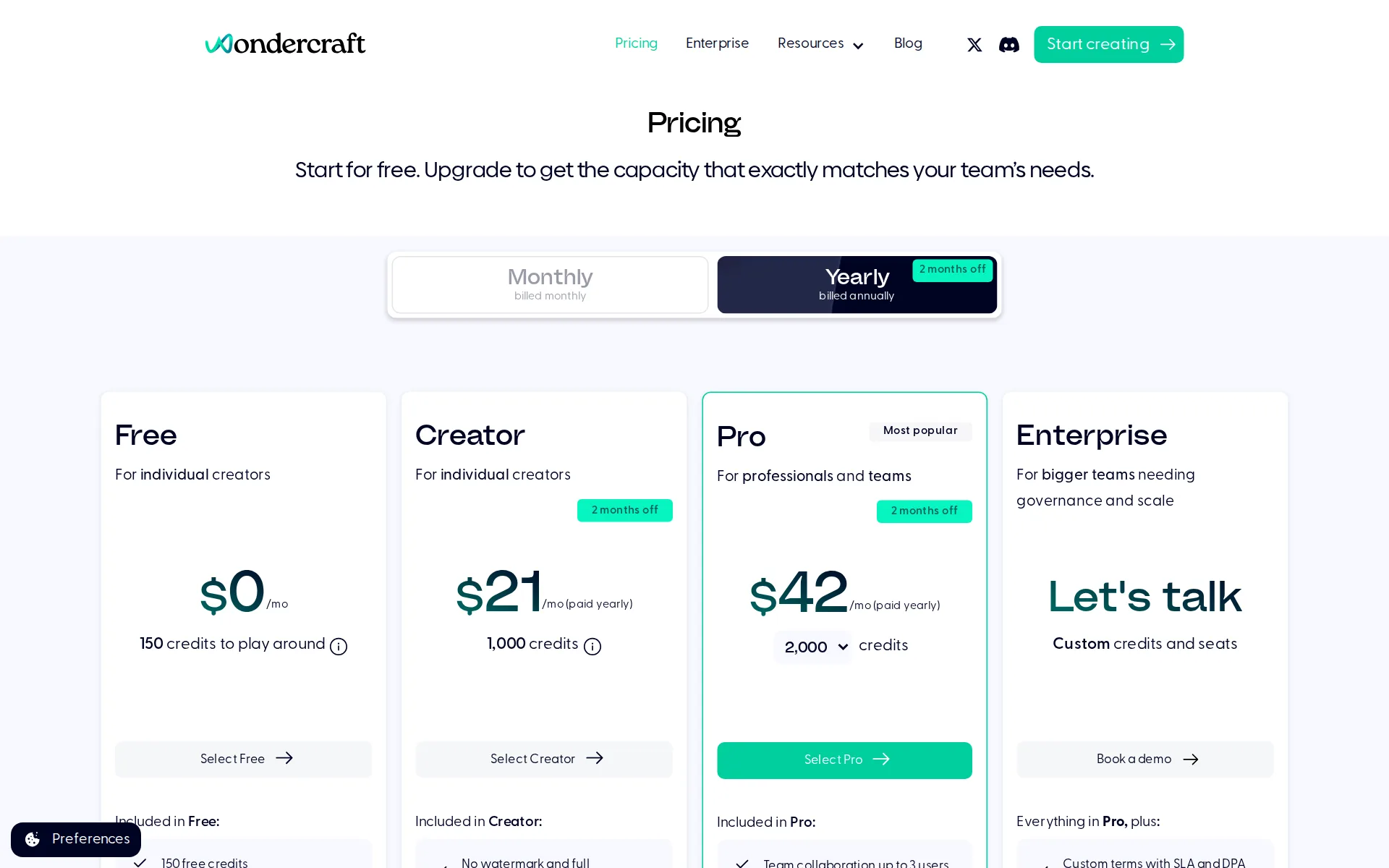
Pricing page, captured
wondercraft.ai/pricing, checked
What we checked on Wondercraft
Cost for 2 hours a month
$50 a month on Pro for 2 hours of 60 minutes. Billing increment not stated: computed per second (60 min a hour). If they round each hour up to the minute (60 min), it is $50. credits counted per character or per word are converted at the standard hour: 52,000 characters, 9,300 words Creator might cost less, but no overage price is published, so it could not be priced past its allowance.
On the page: Plan cards, Pro card price cell with its credit selector at its default 2,000, Monthly state
wondercraft.ai/pricingChecked
Cost for 10 hours a month (heavy use)
Ten hours is 600 minutes, about 6,000 credits at the stated 10 credits per minute, and that exact bundle is sold self-serve: the Pro plan's credit selector offers 6,000 credits at $140 per month billed monthly, or $117 per month paid yearly.
Speech 10 credits/minute of speech generated. For example, a 10 minute podcast will cost 100 credits, and a 25 minute podcast will cost 250 credits.
Cost to dub 60 minutes a month
Re-voicing 60 minutes into another language costs about 600 credits of speech generation, which fits inside Creator's 1,000 monthly credits at $25 a month, the cheapest plan carrying full commercial rights; translation itself is done by prompting the Wonda agent rather than billed separately.
On the page: Detailed credit charges, Speech section
Promotion and regular price
yearly shown monthly: the pricing page opens on Yearly, where Creator reads $21 and Pro $42 per month paid yearly; the regular month-to-month rates are $25 and $50, and the monthly view adds a first-month half-price offer on Creator.
Creator For individual creators $21 /mo (paid yearly) 1,000 credits Select Creator 2 months off
wondercraft.ai/pricingChecked
What the price counts
Everything is metered in credits rather than characters or minutes, with speech at 10 credits a minute; the published monthly allowances are 150 on Free, 1,000 on Creator, a choice of 2,000, 4,000 or 6,000 on Pro, and custom credits on Enterprise.
A credit on Wondercraft is a unit used to create AI-generated content
wondercraft.ai/pricingChecked
Voices that use more
The two premium performance modes burn the allowance twice as fast: standard and Convo Mode speech cost 10 credits a minute, while Parrot Mode and Director Mode each cost 20 credits a minute, and those two modes are restricted to Pro and Enterprise.
Parrot mode costs 20 credits/minute of speech generated. Director mode costs 20 credits/minute of speech generated.
Past your allowance
When the monthly allowance runs out you can buy one-off top-up bundles from the studio's Billing & Plan settings rather than being forced up a plan, but the vendor publishes no price for those bundles anywhere on the site, so the overage rate is not knowable before you sign in.
Yes! Wondercraft offers one-off credit top-up bundles: Go to wondercraft.ai/studio . Click on your email address in the bottom left corner. Select…
Unused credits
Unused credits do carry over for paid Creator, Pro and Enterprise subscribers, but only for a single month before they expire, and the carry-over stops entirely if you drop back to the free plan.
For paid Creator, Pro and Enterprise subscribers, unused credits roll over into the next month, if you remain a paid subscriber. Note that credits…
Commercial use
Publishing and monetizing the audio starts on the cheapest paid plan, Creator at $25 a month, and the license survives cancellation; free users are held to personal use only.
All voices, songs and sound effects available from Wondercraft audio studio are royalty-free and licensed for personal and commercial use for paid…
Stock voices
The vendor describes thousands of preset voices drawn from several third-party engines in one picker, plus a Voice Foundry for generating new voices from a written description, but it never publishes an exact count of library voices.
Choose instantly among ElevenLabs, Gemini, OpenAI, Cartesia, and thousands of preset voices—no model-hopping required.
Languages
The help center lists 64 supported languages alphabetically, and several are broken out by accent rather than language, including English for Australia, Canada, the UK and the US, French for Canada and France, Portuguese for Brazil and Portugal, and Spanish for Mexico and Spain.
We support these languages currently, arranged in alphabetical order.
Re-voice your recording
Parrot Mode takes a recording of you reading the line, whether uploaded or captured in the browser, and returns it in an AI voice that keeps your intonation, rhythm and accent; the vendor notes it suits short clips rather than a whole audiobook, and it is a Pro and Enterprise feature.
Parrot Mode lets you record yourself reading the script, then the AI generates audio in an AI voice that mimics your intonation, rhythm, and accent.
Emotion, pace and emphasis
Three documented layers of control: inline audio tags for tone and mid-sentence delivery changes, Director Mode for iterative clip-level refinement, and Parrot Mode; pauses and speed are separate timeline operations, and Director and Parrot Modes need Pro or Enterprise.
three ways to fine-tune how an AI voice performs your script: inline prompts for quick direction, Director Mode for iterative clip-level refinement,…
Pronunciation fixes
You can register a word with its spelling, pronunciation and language once in account settings so names and technical terms are read consistently across projects, with an optional case-sensitive match, but the vendor states this does not yet apply inside Convo Mode.
Note that Custom pronunciations don't support Convo Mode yet, but we are working on this.
Long scripts and chapters
A pasted script becomes one clip per paragraph in a single timeline project and paid users get two free regenerations of a clip when edits stay under 25 characters, but a multi-chapter book is not one project: the vendor's own instructions are to build and export each chapter as a separate file.
If you are creating an audiobook with multiple chapters created in different Wondercraft files, make sure to export and save each file with the…
Audiobook files
Audiobooks are a named use case and the vendor documents publishing one to Spotify, but the retail-ready step is not in the product: you export MP3 or WAV per chapter and then convert them with a third-party W3C audiobook packer before uploading.
Convert your audio file(s) to an LPF (Lightweight Packaging Format). You can do this via a free tool such as Bookery's W3C Audiobook Packer
Several speakers
One project can hold several speakers by prefixing each line with a bracketed speaker name, and the vendor contrasts that with Convo Mode, its two-host podcast format, which is explicitly capped at two speakers.
Note that Convo Mode supports 2 speakers only.
Audio you get
Every audio track can be downloaded as MP3 or WAV, with bitrate and channels chosen at export, and speaker stems can be pulled out by muting the other tracks before exporting; video projects export at 720p, 1080p or 4K.
All audio files produced on Wondercraft can be downloaded as MP3 or WAV files. We support the following audio quality: MP3: 96khz, 128khz, 192khz…
Instant cloning
A clone can be made from an audio sample recorded in the browser or uploaded, which the vendor rates at 90% accuracy; the entry paid Creator plan includes one custom AI character and Pro lifts that to unlimited custom characters.
Clone Replicates a real person's voice from an audio sample (90% accuracy) Voice tab > Add your own voice > Clone
Professional cloning
A higher-fidelity Professional Voice Clone needing roughly 40 minutes of clean audio is supported at 99% accuracy, but it is gated to Pro and Enterprise and is not actually trained by Wondercraft: you must hold your own ElevenLabs Creator-or-above subscription and import the clone.
Note that Professional Voice Cloning (PVC) is only available to our Pro and Enterprise users.
Consent of the voice’s owner
The vendor states a consent rule and puts the burden on the user: explicit permission is required before cloning anyone else's voice, cloning celebrities or public figures without consent is prohibited, and proceeding is treated as your confirmation that you hold the rights.
Before proceeding with voice cloning, please ensure that you have obtained explicit permission from the individual whose voice you wish to clone (if…
Your voice trains their models
The terms of service rule training out rather than offering an opt-out: the license you grant covers providing and improving the service only, and the vendor adds an explicit clause that no input will be used to train or refine models, which covers uploaded cloning samples.
For the avoidance of doubt, no Input will be used to train or refine artificial intelligence, machine learning models, or related technologies.
Video dubbing
There is a translation route but not one-click dubbing: you ask the Wonda agent to translate an existing project's script, pick a native voice for the target language and regenerate the speech, and the vendor warns the output may read as translated and should be reviewed by a native speaker.
Once you have imported or generated a script, ask our AI agent Wonda to translate the project into a different language.
Lip sync
Lip sync is documented as a property of the AI avatar presenters you generate, with FLipsync-2-Pro offered for dialogue-heavy scripts, rather than as a way to re-sync the mouth of a real speaker in footage you upload for dubbing.
FLipsync-2-Pro Precise lip sync for clear speech alignment and dialogue-heavy scripts.
Editing the translation
The translated script is editable text in the editor before any audio is made, since each paragraph becomes its own clip and speech is only generated when you choose, and timing can then be adjusted on the timeline with trims, splits and pause controls.
Paste your text in the script section. Each paragraph automatically becomes a separate audio clip.
Captions and subtitles
Auto captions are generated for a whole project or selected clips with style presets, but the vendor states they can only be produced after the voice-over audio exists and are built from the audio rather than the script, and it documents them as rendered into the exported video rather than as a separate subtitle file.
Captions are generated from your audio, not directly from your script text. This means that you can't generate captions before generating audio.
Voice to video
Voice-over is placed against the picture in the product's own timeline editor, with canvas layouts, layers, trims, captions, branding and resizing in the same window, and uploaded clips can sit beside generated ones.
The studio is a full video editor for refinement and control. Timeline, canvas, layouts, captions, branding, resizing, layers, and export all live…
wondercraft.aiChecked
Team seats
Pro includes team collaboration for up to 3 users, and beyond that extra editor seats are invoiced to the workspace owner with all members' credit use pooled onto that one subscription, but no per-seat price is published and creating further teamspaces requires a Business or Enterprise plan.
Team collaboration up to 3 users
wondercraft.ai/pricingChecked
API
An API is offered from the entry paid plan upward, with keys generated in workspace settings, so Creator buyers get it, but the free plan does not; the vendor also lists capabilities the API cannot do, including sound effects, timeline edits and uploading your own audio.
Wondercraft offers API for our Creator, Pro, and Enterprise users.
API price
There is no separate currency rate card for the API: it draws on the same plan credits, and the docs put generated audio at roughly 10 credits per minute, with image and video jobs priced per model and resolution through the models endpoints, so cost per million characters is never published.
You can expect 1 min of generated audio to cost roughly 10 credits.
Publishes to YouTube
The documented YouTube route is podcast publishing, not video upload or added audio tracks: you copy the RSS feed from Wondercraft and submit it in YouTube Studio as a new podcast, so a dubbed second audio track on an existing YouTube video is not part of it.
Copy your RSS feed from Wondercraft Learn how to Find RSS feed to publish a podcast Publish your podcast on YouTube Log into YouTube Studio .
Platforms
web: the vendor points everyone to a browser studio at wondercraft.ai/studio, where recording for cloning happens directly in the browser, and it documents no Windows, Mac, iOS or Android application anywhere on its site.
To get started for free, visit the Wondercraft app at wondercraft.ai/studio .
wondercraft.ai/audiobookChecked
Works inside
It plugs into publishing and voice tooling rather than creative suites: an RSS feed carries finished podcasts to Spotify, Apple Podcasts and YouTube, a Professional Voice Clone can be imported from an ElevenLabs account, and an API covers everything else; no Canva, Adobe or WordPress plugin is documented.
On the page: Wondercraft API article, opening line
AI labelling
Watermarking is only mentioned as something paying removes, with the Creator plan selling 'No watermark and full commercial rights' and so implying free exports carry one; no AI-generated label, embedded provenance metadata or way to check a finished file is documented anywhere.
On the page: Plan cards, Creator column, first 'Included in Creator' bullet
wondercraft.ai/pricingChecked
Who owns the audio
Copyright in what you make is stated to rest with you alone, and the license for the vendor's voices, music and sound effects is royalty-free both during and after the subscription, so paid work stays usable after you cancel.
The copyright of everything you create on Wondercraft lies with you and you only.
Free plan or trial
A standing free plan, not a trial, lets you run your own script: 150 credits, which is about 15 minutes of generated speech at the published rate, with all video editing included but only limited access to AI models and exports capped at 720p.
150 free credits Limited access to AI models Access to all video editing Up to 720p export resolution
wondercraft.ai/pricingChecked
What the free plan leaves on your audio
Free output is both watermarked and commercially off-limits: removing the watermark is sold as a Creator benefit, and the license article restricts free users to personal, non-commercial use of the vendor's voices, songs and sound effects.
For Starter or Free users, all Wondercraft-owned voices, songs and sound effects are strictly restricted to personal and non-commercial uses only.
Still sold
live: the product is selling to new customers today, with a self-serve pricing page, a newly launched Convo Mode announced in the site banner, and a current video studio positioning across the marketing pages.
Start for free. Upgrade to get the capacity that exactly matches your team's needs.
wondercraft.ai/pricingChecked
Sign up without a sales call
Free, Creator and Pro are bought without talking to anyone, straight from the plan cards, and no credit card is needed to start; only Enterprise is gated behind sales, where the card shows 'Let's talk' and a demo booking instead of a price.
Enterprise For bigger teams needing governance and scale Let's talk Custom credits and seats Book a demo
wondercraft.ai/pricingChecked
Contract and cancelling
Both terms are sold, monthly or yearly with the yearly one advertised as two months off, and you can cancel yourself at any time in the studio's billing settings; the vendor notes support cannot cancel for you and that each workspace must be canceled separately.
You can cancel your subscription at any time. If you work in a team, only the workspace Owner can cancel the subscription.
Support
Two documented channels: a chat bubble inside the studio for questions and bug reports, with follow-up by email if it cannot be answered straight away, and direct email to support@wondercraft.ai; no business hours or response time is published, and a dedicated account manager is an Enterprise item.
Click on the chat bubble on the bottom right-hand corner of the audio studio to ask a question, report a bug, or give us some feedback.
Wondercraft alternatives
All 9 alternatives6 more alternatives
All 9 publish a price.
- VoicemakerFree, then $5 a monthCredit-metered AI text-to-speech studio with 2,000+ voices, voice cloning, speech-to-speech and SRT export.
- SpeechmaFree, then $9 a monthFree text to speech and creator audio tools with no account or credit card.
- Murf AIFrom $29 a monthVoice-over Studio with timeline video syncing, downloadable audio, dubbing, and a public API.
- Fish AudioFree, then $15 a monthExpressive text-to-speech, voice cloning and long-form studio with a credit-metered API.


Sources and changes
Last changed
Sources26
- wondercraft.ai/pricing
- support.wondercraft.ai/articles/6841806595-how-are-credits-charged
- support.wondercraft.ai/articles/1840718473-license-and-copyright
- support.wondercraft.ai/articles/2846305404-import-and-edit-own-script-with-one-or-more-speakers
- support.wondercraft.ai/articles/8205680899-wondercraft-api
- support.wondercraft.ai/articles/8617705264-advanced-ai-voice-performance-controls
- support.wondercraft.ai/articles/9170804094-publish-your-audiobook-to-spotify
- wondercraft.ai/
- wondercraft.ai/ai-model/avatars
- support.wondercraft.ai/articles/1734382580-cancel-or-pause-a-subscription
- support.wondercraft.ai/articles/1882785888-translate-a-wondercraft-made-audio-track
- support.wondercraft.ai/articles/3391606129-terms-of-service
- support.wondercraft.ai/articles/3411847738-can-i-download-audio-tracks-as-mp3-or-wav-files
- support.wondercraft.ai/articles/4018688083-can-i-buy-or-top-up-credits-as-a-one-off
- support.wondercraft.ai/articles/4388137777-chat-to-us
- support.wondercraft.ai/articles/4434392281-create-edit-and-add-captions-to-your-video-project
- support.wondercraft.ai/articles/5237054727-what-languages-do-you-support
- support.wondercraft.ai/articles/5352189647-do-unused-credits-rollover
- support.wondercraft.ai/articles/5504587725-uploaded-assets
- support.wondercraft.ai/articles/6940519442-create-or-import-a-professional-voice-cloning-pvc
- support.wondercraft.ai/articles/7060705521-customize-pronunciations
- support.wondercraft.ai/articles/8680441283-clone-a-new-voice
- support.wondercraft.ai/articles/8829850046-publish-your-podcast-to-youtube
- support.wondercraft.ai/articles/9589143990-what-makes-wondercraft-different-from-elevenlabs
- wondercraft.ai/audiobook
- docs.wondercraft.ai/introduction
What changed on this page2
- Dubbing features, free tier, plan limits
- Dubbing features, free tier, license terms, plans
Is this yours?
Claim this listing for free to see who reads it and mark it as yours. You confirm it with an email at wondercraft.ai.
Report an error if a fact is wrong.